> For the complete documentation index, see [llms.txt](https://support.powerio.com/hub/llms.txt). Markdown versions of documentation pages are available by appending `.md` to page URLs; this page is available as [Markdown](https://support.powerio.com/hub/codesys-hvac/en/hvac-library/functionblocks/components/fancontrol.md).
# FanControl
## `FanControl` (FB)
FUNCTION\_BLOCK FanControl
### Short description
> Control of a variable-speed fan (control variables e.g. absolute pressure, differential pressure)\
> Additional functions: manual overrides, maintenance switch, operating hours counter, operation monitoring, air shortage monitoring, limit value monitoring\
> Typical application: control of a fan with frequency converter
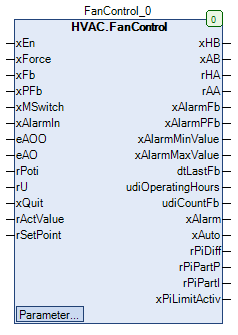
### Representation
### Functional description
#### General
This function block controls a variable-speed fan using a continuous control signal *rHA*.\
The general enable of the fan is via the request *xEn* and the enable signal *xHB*.\
Speed control is performed by means of a freely parameterizable PI controller, to which the setpoint *rSetPoint* and the actual value *rActValue* are supplied and from these the controller output signal is generated.\
\
Essentially the following function blocks are used:
* ControlPI
* ManBin
* ManNum
* TwoPointFun
* Ramp
* CTime
* AirShortage
* OperatingHours
#### Enable - fan before manual override *xAB*
The enable - fan before manual override *xAB* is activated (= TRUE) if the following conditions are simultaneously met:\
\
Case 1:\
\
*xEn* = TRUE\
*xMSwitch* = TRUE\
**xAlarmControl** = FALSE\
\
Case 2:\
\
*xEn* = TRUE\
*xMSwitch* = TRUE\
**xAlarmControl** = TRUE\
*xAlarm* = FALSE\
\
In all other situations, the enable - fan before manual override *xAB* is not activated (= FALSE).
#### Enable - fan after manual override *xHB*
The enable - fan after manual override *xHB* corresponds to the enable - fan before manual override *xAB*, additionally extended by a manual override module.\
The enable can generally only be given if the forced lockout of the fan after manual override is not active (*xForce* = FALSE)\
and collective fault message 2 is not active (= FALSE).
| *xAB* | **eManModeB** | *xHB* | Notes |
| ----- | -------------- | ----- | ----------------------------------------- |
| FALSE | eMANBIN.Auto | FALSE | Manual override module in automatic mode |
| TRUE | eMANBIN.Auto | TRUE | Manual override module in automatic mode |
| X | eMANBIN.ManOn | TRUE | Manual override module in manual mode On |
| X | eMANBIN.ManOff | FALSE | Manual override module in manual mode Off |
Legend: X = any
#### Maintenance switch message *xMSwitch*
*xMSwitch* = TRUE: repair switch has not been triggered (normal state)\
*xMSwitch* = FALSE: maintenance switch has tripped (fault state)
#### Forced lockout of the fan after manual override *xForce*
*xForce* = FALSE: no forced lockout (normal state)\
*xForce* = TRUE: forced lockout (exception state)
#### Operating hours and switch-on cycles *udiOperatingHours* and *udiCountFb*
The number of operating hours and switch-on cycles are recorded (= counting process active) if the fan operating signal *xFb* is active and at the same time collective fault message 2 is not active (= FALSE).\
The results are available at the counter outputs **udiOperatingHours** and **udiCountFb** .
> **Write access to the counter values**
>
> Via the path ‘InstanceName.\_OperatingHours.udiOperatingHours’ or ‘InstanceName.\_OperatingHours.udiCountFb’, write access to both counter values is possible.
>
> **Prerequisite for using the FanControl function block**
>
> For correct operation, the use of the TimeRead2 function block is required.
#### Date / time of the fan's last operation *dtLastFb*
At output *dtLastFb* the current date / current time is available during the counting process.\
At output *dtLastFb* the date / time at the end of the last counting process is available outside the counting process.\
At output *dtLastFb* the initialization value DT#1970-1-1-0.0.0 is output before the first counting process.
#### Operating supervision *xAlarmFb*
The operating monitoring can be enabled or disabled by the setpoint / parameter **xFbControl** (= TRUE) or blocked (= FALSE).\
\
When monitoring is blocked, the fault message of the operating monitoring *xAlarmFb* is always blocked (= FALSE).\
When monitoring is enabled, the fault message of the operating monitoring *xAlarmFb* is activated (= TRUE) if the following states are present simultaneously during a minimum time period **udiFbControlTime** the following states are given:\
\
*xHB* and *xFb* = unequal (enable state and operating state do not match)\
*eAOO* = HVACTYPES.eManBin.Auto (manual override - hardware for enable in automatic mode)\
**xFbControl** = TRUE (operating monitoring is enabled)\
\
The fault message of the operating monitoring *xAlarmFb* is reset (= FALSE) if at least one of the following conditions is met:\
\
*eAOO* = HVACTYPES.eManBin.Auto (switching back to automatic mode of the manual override - hardware)\
*xQuit* = TRUE (reset of the monitors is active)\
**xFbControl** = FALSE (operating monitoring blocked)
#### Air shortage monitoring *xAlarmPFb*
The air shortage monitoring is carried out by evaluating the states at the inputs *xPFb* or *xFb*.\
\
The fault message of the air shortage monitoring *xAlarmPFb* is activated (= TRUE) if, with monitoring enabled (**xPFbControl** = TRUE) during the message delay of the air shortage monitoring **udiPFbControlTime** the input *xPFb* is permanently not active (= FALSE) and the\
input *xFb* is active (= TRUE).\
\
The fault message of the air shortage monitoring *xAlarmPFb* is deactivated (= FALSE) if the conditions for activation are no longer met and at the same time the monitoring is blocked (**xPFbControl** = FALSE) and / or the reset of the fault messages (monitors) active (*xQuit* = TRUE).
#### Collective fault message 1 - output *xAlarm*
The collective fault message is activated (= TRUE) if at least one of the conditions described below is met.\
\
*xAlarmIn* = TRUE (fault message of the fan is active)\
*xAlarmFB* = TRUE (fault from the operating monitoring)\
*xAlarmPFB* = TRUE (fault from the air shortage monitoring)\
*xMSwitch* = FALSE (maintenance switch in Off position)\
*xAlarmMaxValue* = TRUE (maximum value exceeded)\
*xAlarmMinValue* = TRUE (minimum value undershot)\
\
In all other cases the collective fault is not active (= FALSE).
#### Collective fault message 2
The collective fault message is activated (= TRUE) if at least one of the conditions described below is met.\
\
*xAlarmIn* = TRUE (fault message of the fan is active)\
*xAlarmFB* = TRUE (fault from the operating monitoring)\
*xAlarmPFB* = TRUE (fault from the air shortage monitoring)\
*xMSwitch* = FALSE (maintenance switch in Off position)\
*xAlarmMaxValue* = TRUE (maximum value exceeded)\
\
In all other cases the collective fault is not active (= FALSE).
#### Resetting the fault messages *xQuit*
Every rising edge (FALSE > TRUE) at the input *xQuit* clears any fault messages that may be present from the following monitoring devices:\
\
Air shortage monitoring\
Operation monitoring\
Minimum value monitoring\
Maximum value monitoring
#### Control process
General\
\
The actual value rActValue is scaled by a linear characteristic curve and fed to the PI controller.\
The setpoint rSetPoint is filtered by a signal ramp, scaled by a linear characteristic curve and fed to the PI controller.\
The output signal of the PI controller is filtered by another signal ramp and fed to the output for the control signal rHA.\
\
\
Enable\
\
The control process is enabled with a time delay of udiWaitControl after the active fan operating message (xFb = TRUE).\
The control process is blocked without time delay after the inactive fan operating message (xFb = FALSE).\
\
\
Setpoint\
\
The setpoint is fixed to value 0.0 if the fan enable is not active (xHB = FALSE).\
The setpoint is taken from input rSetPoint, filtered by a signal ramp and scaled by a linear function defined by 2 points (prerequisite: xHB = TRUE).\
The relevant parameters of the signal ramp can be set individually (maximum variation = (rMaxValue / 5) per 10s).\
The relevant parameters of the linear function can be set individually (input range in Pa: 0.0 - rMaxValue, output range in %: 0.0 - 100.0).\
\
\
Actual value\
\
The actual value is taken from input rActValue and scaled by a linear function defined by 2 points.\
The relevant parameters of the linear function can be set individually (input range in Pa: 0.0 - rMaxValue, output range in %: 0.0 - 100.0).\
\
\
Limitation of the PI controller output signal rYMin and rYMax\
\
The controller output signal (PI controller) is limited by the adjustable limit values rYMin and rYMax (minimum value monitoring not active) or rSubstitueHA (minimum value monitoring active).\
\
\
Signal ramp of the output signal from the PI controller\
\
The output signal from the PI controller is filtered by a signal ramp.\
The relevant parameters of the signal ramp can be set individually (maximum variation = rYRampVariation per rYRampTime).\
\
\
Parameters of the PI controller\
\
The parameters essential for the control behavior can be specified externally. They must be adapted depending on the controlled system.\
A useful base parameterization has already been made, which is sufficient in many applications.\
\
rYMin = Lower absolute limit value of the controller output signal\
rYMax = Upper absolute limit value of the controller output signal\
rOffset = Setpoint offset - controller\
rKp = Gain factor - controller\
rTn = Reset time - controller in s\
eAction = Direction of action of the controller (inverted, direct)\
rInitValue = Initialization value for the control signal\
rYDisabled = Control signal when controller is inactive\
\
\
Signals of the PI controller\
\
The signals calculated during the control process (before the signal ramp) are available for monitoring the control process.\
\
rPiDiff = Control deviation at the controller\
rPiPartP = Proportional component of the control signal\
rPiPartI = Integral component of the control signal\
xPiLimitActiv = Status - limit value exceeded - control signal (FALSE = Off, TRUE = On)\
\
\
Controller output signal\
\
When the controller is not enabled, the switch-off value rYDisabled is transferred to the controller output signal output (prerequisite: ePiManModeN = eMANNUM.Auto) and limited by the absolute limit values.\
The integral component is set to 0.0.\
\
When the controller is enabled, the controller output signal is calculated (prerequisite: ePiManModeN = eMANNUM.Auto) and limited by the absolute limit values.\
\
With the default setting of the direction of action eAction (= eControlMode.Inverted), an actual value that is too low (actual value < setpoint) causes a continuous increase in the value of the controller output signal.
#### Control signal fan before manual override *rAA*
The control signal of the fan before manual override *rAA* is primarily adopted from the controller output signal after the signal ramp.\
However, this output signal is additionally limited during the fan request (*xHB = TRUE) by the lower absolute limit value rYMin* limited downward.\
In the event of a minimum value undershoot (*xAlarmMinValue* = TRUE) the control signal before manual override *rAA* by the fixed value **rSubstitueHA** is replaced.
#### Control signal fan after manual override *rHA*
The fan control signal after manual override *rHA* corresponds to the control signal of the fan before manual override *rAA* additionally extended by a manual override module.
| *rAA* | **eManModeN** | *rHA* | Notes |
| ----- | ------------- | ------------- | ---------------------------------------- |
| X | eMANNUM.Auto | *rAA* | Manual override module in automatic mode |
| X | eMANNUM.Man | **eManValue** | Manual override module in manual mode |
Legend: X = any
#### Operating mode for the controller output signal **ePIManModeN**
The parameter **ePiManModeN** allows switching the controller output signal from automatic to manual mode and vice versa.\
In manual mode, the controller output signal adopts the output signal in manual mode **ePiManValue**.
| **ePiManModeN** | output signal | Function |
| --------------- | ---------------------------------------------- | ------------------------------ |
| eMANNUM.Auto | Signal according to formula / switch-off value | Automatic mode - output signal |
| eMANNUM.Man | **ePiManValue** | Manual mode - output signal |
#### Monitoring of maximum pressure *xAlarmMaxValue*
The output *xAlarmMaxValue* is activated (= TRUE) if, over a minimum duration of 10 s, the current actual value *rActValue* the adjustable maximum value **rMaxValue** exceeds.\
The output *xAlarmMaxValue* is deactivated (= FALSE) if the current actual value *rActValue* the adjustable maximum value **rMaxValue** falls below and at the same time at the input *xQuit* a rising edge (FALSE > TRUE) is detected.
#### Monitoring of minimum pressure *xAlarmMinValue*
The output *xAlarmMinValue* is activated (= TRUE) if, over a minimum duration **udiWaitMinValue** (1.0 - 600.0 s) the following conditions are continuously met simultaneously:\
\
*xFb* = TRUE (fan is in operation)\
*eAO* = HVACTYPES.eManNum.Auto (manual override operating mode - hardware for the control signal in automatic mode)\
*rHA* > **rMinHAValue** (control signal is greater than the minimum value)\
*rActValue* < **rMinValue** (actual value is smaller than the minimum value)\
No rising edge (FALSE > TRUE) was detected at the input *xQuit* detected\
The output *xAlarmMinValue* is deactivated (= FALSE) if the activation conditions are no longer met and at the same time at the input *xQuit* a rising edge (FALSE > TRUE) is detected.
#### Collective automatic operation message *xAuto*
The collective automatic operation message *xAuto* is activated (= TRUE) if the following conditions are simultaneously met:
* Input *eAOO* = HVACTYPES.eManBin.Auto
* Input *eAO* = HVACTYPES.eManNum.Auto
* Setpoint / parameter **eManModeB** = eMANBIN.Auto
* Setpoint / parameter **eManModeN** = eMANNUM.Auto
* Setpoint / parameter **ePiManModeN** = eMANNUM.Auto
### CODESYS
InOut:
| Scope | Name | Type | Initial |
| ----------- | ------------------- | ------------ | --------------------- |
| Input | `xEn` | `BOOL` | |
| Input | `xForce` | `BOOL` | FALSE |
| Input | `xFb` | `BOOL` | |
| Input | `xPFb` | `BOOL` | |
| Input | `xMSwitch` | `BOOL` | TRUE |
| Input | `xAlarmIn` | `BOOL` | |
| Input | `eAOO` | eManBin | eManBin.Auto |
| Input | `eAO` | eManNum | eManNum.Auto |
| Input | `rPoti` | `REAL` | |
| Input | `rU` | `REAL` | |
| Input | `xQuit` | `BOOL` | FALSE |
| Input | `rActValue` | `REAL` | |
| Input | `rSetPoint` | `REAL` | |
| Output | `xHB` | `BOOL` | |
| Output | `xAB` | `BOOL` | |
| Output | `rHA` | `REAL` | |
| Output | `rAA` | `REAL` | |
| Output | `xAlarmFb` | `BOOL` | |
| Output | `xAlarmPFb` | `BOOL` | |
| Output | `xAlarmMinValue` | `BOOL` | |
| Output | `xAlarmMaxValue` | `BOOL` | |
| Output | `dtLastFb` | `DT` | |
| Output | `udiOperatingHours` | `UDINT` | |
| Output | `udiCountFb` | `UDINT` | |
| Output | `xAlarm` | `BOOL` | |
| Output | `xAuto` | `BOOL` | |
| Output | `rPiDiff` | `REAL` | |
| Output | `rPiPartP` | `REAL` | |
| Output | `rPiPartI` | `REAL` | |
| Output | `xPiLimitActiv` | `BOOL` | |
| Input Const | `rMaxValue` | `REAL` | 490 |
| Input Const | `rSubstituteHA` | `REAL` | 30 |
| Input Const | `udiWaitMinValue` | `UDINT` | 60 |
| Input Const | `rMinHAValue` | `REAL` | 20 |
| Input Const | `rMinValue` | `REAL` | 20 |
| Input Const | `tYRampTime` | `TIME` | TIME#1m0s0ms |
| Input Const | `rYRampVariation` | `REAL` | 30 |
| Input Const | `udiWaitControl` | `UDINT` | 30 |
| Input Const | `rYMax` | `REAL` | 100 |
| Input Const | `rYMin` | `REAL` | 20 |
| Input Const | `rTn` | `REAL` | 60 |
| Input Const | `rKp` | `REAL` | 1 |
| Input Const | `rOffset` | `REAL` | 0 |
| Input Const | `rInitValue` | `REAL` | 20 |
| Input Const | `rYDisabled` | `REAL` | 0 |
| Input Const | `eAction` | eControlMode | eControlMode.Inverted |
| Input Const | `ePiManValue` | `REAL` | |
| Input Const | `ePiManModeN` | eMANNUM | eMANNUM.Auto |
| Input Const | `udiPFbControlTime` | `UDINT` | 60 |
| Input Const | `xPFbControl` | `BOOL` | TRUE |
| Input Const | `xAlarmControl` | `BOOL` | TRUE |
| Input Const | `udiFbControlTime` | `UDINT` | 60 |
| Input Const | `xFbControl` | `BOOL` | TRUE |
| Input Const | `rManValue` | `REAL` | |
| Input Const | `eManModeN` | eMANNUM | eMANNUM.Auto |
| Input Const | `eManModeB` | eMANBIN | eMANBIN.Auto |
Methods:
> mQuit
> mResetOperatingHours
Structure:
* mQuit (Method)
* mResetOperatingHours (Method)
---
# Agent Instructions
This documentation is published with GitBook. GitBook is the documentation platform designed so that both humans and AI agents can read, navigate, and reason over technical content effectively. Learn more at gitbook.com.
## Querying This Documentation
If you need additional information that is not directly available in this page, you can query the documentation by asking a question.
Perform an HTTP GET request on the following URL with the `ask` and `goal` query parameters:
```
GET https://support.powerio.com/hub/codesys-hvac/en/hvac-library/functionblocks/components/fancontrol.md?ask=&goal=
```
`ask` is the immediate question: it should be specific, self-contained, and written in natural language.
`goal` is what the user is ultimately trying to achieve, the reason they need the answer. Sharing it helps GitBook give you a better, more relevant answer. A goal is most helpful when it describes the outcome the user wants rather than restating the question. For example, with `ask=how do I create an API token`, a goal like `automate deployments from our CI pipeline` lets GitBook tailor the answer to that use case.
The response will contain a direct answer to the question and relevant excerpts and sources from the documentation.
Use this mechanism when the answer is not explicitly present in the current page, you need clarification or additional context, or you want to retrieve related documentation sections.