> For the complete documentation index, see [llms.txt](https://support.powerio.com/hub/llms.txt). Markdown versions of documentation pages are available by appending `.md` to page URLs; this page is available as [Markdown](https://support.powerio.com/hub/codesys-hvac/en/hvac-library/functionblocks/components/burnert.md).
# BurnerT
## `BurnerT` (FB)
FUNCTION\_BLOCK BurnerT
### Short description
> Control of a heat generator (temperature setpoint via temperature signal)\
> \
> Typical application: heat generation
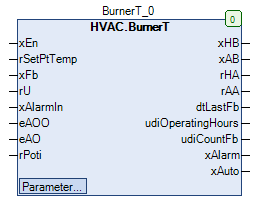
### Representation
### Function description
#### General
This function block is used to control a heat generator depending on the generator's demand *xEn* and the flow setpoint temperature *rSetPtTemp*.\
The enable / disable of the heat generator is done via the output *xHB* (FALSE = lockout, TRUE = enable).\
The temperature signal is generated from the flow setpoint temperature *rSetPtTemp* using a linear characteristic defined by two points, if the heat generator is enabled (*xHB* = TRUE).\
If the heat generator is locked, the constant 0.0 is output.\
\
The following function blocks are essentially used:
TwoPoint
OperatingHours
ManBin
ManNum
#### Enable / disable of the heat generator *xHB*
The enabling of the heat generator (*xAB* = TRUE, *xHB* = TRUE (eManModeB = eManBin.Auto)) occurs if the heat generator demand is active (*xEn* = TRUE).\
The lockout of the heat generator (*xAB* = FALSE, *xHB* = FALSE (eManModeB = eManBin.Auto)) occurs if the heat generator demand is not active (*xEn* = FALSE).
#### Temperature signal for the heat generator *rHA*
The temperature signal for the heat generator is passed to the output *rAA* (and *rHA*, if eManModeN = eManNum.Auto) if the heat generator is enabled (*xHB* = TRUE).\
If the heat generator is locked (*xHB* = FALSE) the constant 0.0 is output.\
The temperature signal is generated from the flow setpoint temperature *rSetPtTemp* using a linear characteristic defined by two points and is absolutely limited to the range 0.0 - 100.0 %.\
The input characteristic is defined by the setpoints / parameters **rTwoPointX1** or **rTwoPointX2** defined.\
The output characteristic is defined by the setpoints / parameters **rTwoPointY1** or **rTwoPointY2** defined.\
The line defined by points P1 (X1 / Y1) and P2 (X2 / Y2) now allows the assignment of any flow setpoint temperatures *rSetPtTemp* to a temperature signal *rAA*.\
\
Example:\
\
Characteristic: X1 = 20.0, X2 = 90.0, Y1 = 20.0, Y2 = 100.0\
\
\&#xNAN;*rSetPtTemp* = 55.0 °C\
\
\&#xNAN;*rAA* = 60.0 %
#### Manual override of the digital output *xHB*
The enabling/locking of the heat generator (*xHB*) can be operated either in automatic mode (eMANBIN.Auto) or in one of the two manual modes (eMANBIN.ManOn, eMANBIN.ManOff).
| *xAB* | eMANBIN | *xHB* | Notes |
| ----- | -------------- | ----- | ---------------------------------------------- |
| FALSE | eMANBIN.Auto | FALSE | Manual override module in automatic |
| TRUE | eMANBIN.Auto | TRUE | Manual override module in automatic |
| X | eMANBIN.ManOn | TRUE | Manual override module in manual operation On |
| X | eMANBIN.ManOff | FALSE | Manual override module in manual operation Off |
Legend: X = any
#### Manual override of the analog output *rHA*
The temperature signal (*rHA*) can be operated either in automatic mode (eMANNUM.Auto) or in manual mode (eMANNUM.Man).
| *rAA* | eMANNUM | *rHA* | Notes |
| ----- | ------------ | ------------- | ------------------------------------------ |
| Value | eMANNUM.Auto | Value | Manual override module in automatic |
| X | eMANNUM.Man | **rManValue** | Manual override module in manual operation |
Legend: X = any
#### Aggregate fault *xAlarm*
The aggregate fault *xAlarm* is active (= TRUE) if the fault signal of the heat generator *xAlarmIn* is active (= TRUE).\
In all other situations the aggregate fault *xAlarm* not active (= FALSE).
#### Collective automatic-mode message *xAuto*
The collective automatic-mode message *xAuto* is activated ( = TRUE ) if the following conditions are met simultaneously:
* Input *eAOO* = HVACTYPES.eManBin.Auto
* Input *eAO* = HVACTYPES.eManNum.Auto
* Setpoint / parameters **eManModeB** = eMANBIN.Auto
* Setpoint / parameters **eManModeN** = eMANNUM.Auto
#### Operating hours counter - heat generator
The operating hours counter (*udiOperatingHours*, *udiCountFb*) for the heat generator is active when the running signal is active (*xFb* = TRUE).
> **Write access to the counter values**
>
> Via the path 'InstanceName.\_OperatingHours.udiOperatingHours' or 'InstanceName.\_OperatingHours.udiCountFb' write access to both counters is possible.
>
> **Prerequisite for the use of the function block BurnerT**
>
> The use of the TimeRead2 function block is required for correct operation.
#### Feedback of the heat generator power *rU*
The current **actual** Power of the heat generator can be connected at the input *rU* .\
This input is currently not used for control and regulation purposes.
#### Feedback of the manual value for the power signal from the manual override - hardware *rPoti*
The feedback of the manual value can be at the input *rPoti* .\
This input is currently not used for control and regulation purposes.
#### Not active state (*xEn* = FALSE)
| *xHB* | *xAB* | *rHA* | *rAA* | *dtLastFb* | *udiOperatingHours* | *udiCountFb* | *xAlarm* | *xAuto* | Notes |
| -------------------------------- | ----- | ------------------------------ | ----- | ---------- | ------------------- | ------------ | ------------------- | --------- | ------------- |
| FALSE (eManModeB = eManBin.Auto) | FALSE | 0.0 (eManModeN = eManNum.Auto) | 0 | old value | old value | old value | State of *xAlarmIn* | old value | *xEn* = FALSE |
Legend: X = any
### CODESYS
InOut:
| Scope | Name | Type | Initial |
| ----------- | ------------------- | ------- | ------------ |
| Input | `xEn` | `BOOL` | |
| Input | `rSetPtTemp` | `REAL` | |
| Input | `xFb` | `BOOL` | |
| Input | `rU` | `REAL` | 0 |
| Input | `xAlarmIn` | `BOOL` | |
| Input | `eAOO` | eManBin | eManBin.Auto |
| Input | `eAO` | eManNum | eManNum.Auto |
| Input | `rPoti` | `REAL` | |
| Output | `xHB` | `BOOL` | |
| Output | `xAB` | `BOOL` | |
| Output | `rHA` | `REAL` | |
| Output | `rAA` | `REAL` | |
| Output | `dtLastFb` | `DT` | |
| Output | `udiOperatingHours` | `UDINT` | |
| Output | `udiCountFb` | `UDINT` | |
| Output | `xAlarm` | `BOOL` | |
| Output | `xAuto` | `BOOL` | |
| Input Const | `rTwoPointY2` | `REAL` | 100 |
| Input Const | `rTwoPointX2` | `REAL` | 90 |
| Input Const | `rTwoPointY1` | `REAL` | 20 |
| Input Const | `rTwoPointX1` | `REAL` | 20 |
| Input Const | `rManValue` | `REAL` | 0 |
| Input Const | `eManModeN` | eMANNUM | eMANNUM.Auto |
| Input Const | `eManModeB` | eMANBIN | eMANBIN.Auto |
---
# Agent Instructions
This documentation is published with GitBook. GitBook is the documentation platform designed so that both humans and AI agents can read, navigate, and reason over technical content effectively. Learn more at gitbook.com.
## Querying This Documentation
If you need additional information that is not directly available in this page, you can query the documentation dynamically by asking a question.
Perform an HTTP GET request on the current page URL with the `ask` query parameter, and the optional `goal` query parameter:
```
GET https://support.powerio.com/hub/codesys-hvac/en/hvac-library/functionblocks/components/burnert.md?ask=&goal=
```
`ask` is the immediate question: it should be specific, self-contained, and written in natural language.
`goal` is optional and describes the broader end goal you are ultimately trying to accomplish on behalf of the user. GitBook uses it to tailor the answer towards what is most useful for that goal.
The response will contain a direct answer to the question and relevant excerpts and sources from the documentation.
Use this mechanism when the answer is not explicitly present in the current page, you need clarification or additional context, or you want to retrieve related documentation sections.