> For the complete documentation index, see [llms.txt](https://support.powerio.com/hub/llms.txt). Markdown versions of documentation pages are available by appending `.md` to page URLs; this page is available as [Markdown](https://support.powerio.com/hub/codesys-hvac/hvac-library/functionblocks/setpoint/setpointcorrection.md).
# SetPointCorrection
## `SetPointCorrection` (FB)
FUNCTION\_BLOCK SetPointCorrection
### Kurzbeschreibung
> Erzeugung einer Solltemperatur in Abhängigkeit von der Raumabweichung\
> Prinzip: Lineare Verschiebung\
> Typische Anwendung: Anpassung einer Vorlaufsolltemperatur
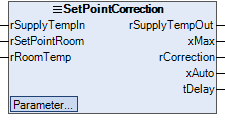
### Darstellung
### Schnittstellen
#### Eingänge
| Name | Datentyp | Wertebereich | Initialwert | Funktion |
| --------------- | -------- | ------------ | ----------- | ----------------------------------- |
| *rSupplyTempIn* | REAL | | 0 | Vorlaufsolltemperatur aus Heizkurve |
| *rSetPointRoom* | REAL | | 0 | Solltemperatur Raum |
| *rRoomTemp* | REAL | | 0 | Aktuelle Raumtemperatur |
#### Ausgänge
| Name | Datentyp | Wertebereich | Initialwert | Funktion |
| ---------------- | -------- | ------------ | ----------- | ---------------------------------------------------------------------------------------------- |
| *rSupplyTempOut* | REAL | | | korrigierte Vorlaufsolltemperatur |
| *xMax* | BOOL | | | Überschreitung der maximalen Differenz der Raumtemperatur. (FALSE = nicht aktiv, TRUE = aktiv) |
| *rCorrection* | REAL | | | Anzeige der aktuellen Korrektur |
| *xAuto* | BOOL | | | Hand-Auto Übersteuerung Anzeige: (FALSE = Hand, TRUE = Auto) |
| *tDelay* | TIME | | | Anzeige Rückschaltverzögerung nach Überschreitung |
#### Sollwerte / Parameter
| Name | Datentyp | Wertebereich | Initialwert | Funktion |
| ------------- | -------- | ------------------------- | ----------- | ------------------------------------------------------------------------------------------------- |
| **tAlaTime** | TIME | | 120 | Wiederanlaufzeit der Korrektur nach dem Alarmanfang. |
| **rAlaLevel** | REAL | | 5.0 | Temperaturabweichung für Alarmzustand. In diesem Zustand wird die Korrektur nicht mehr angewandt. |
| **rCorNeg** | REAL | <= 0 | -2.0 | Maximale negative Korrektur. |
| **rCorPos** | REAL | >= 0 | 2.0 | Maximale positive Korrektur. |
| **rFactor** | REAL | | 1.0 | Korrektur des Sollwertes pro Grad Abweichung der Raumtemperatur. |
| **rManValue** | REAL | | 0.0 | Handübersteuerung: Handwert |
| **eManModeN** | eMANNUM | eMANNUM.Auto, eMANNUM.Man | | Handübersteuerung: Betriebsart |
### Funktionsbeschreibung
#### Allgemeines
Die Korrektur erfolgt proportional zwischen dem Raumtemperatursollwert rSetPointRoom und der Raumtemperaturmessung rRoomTemp.\
Die Abweichung wird durch den einstellbaren Korrekturfaktor multipliziert.\
Diese Korrektur wird beim Vorlaufsollwert rSetPointIn angewandt. Der korrigierte Sollwert ist am Ausgang rSetpointOut verfügbar.\
Für die Korrektur können maximale und minimale Werte frei parametriert werden.\
Erreicht die Korrektur die parametrierte Alarmstufe, wird sie als wichtige Störung des geheizten Raumes\
betrachtet und der Sollwert wird nicht mehr korrigiert (z.B. Fenster offen). In diesem Fall wird die Korrektur deaktiviert (rCorrection=0, rSetpointOut=W)\
und der Binär-Ausgang xMax auf 1 gestellt. Nach der parametrierten Wiederanlaufzeit, versucht die Funktion die Korrektur wieder zu aktivieren.\
Wird die Korrektur reaktiviert, stellt sich das Binär-Signal xMax zurück auf 0.\
Die angewandte Korrektur kann ständig am Ausgang rCorrection beobachtet werden.
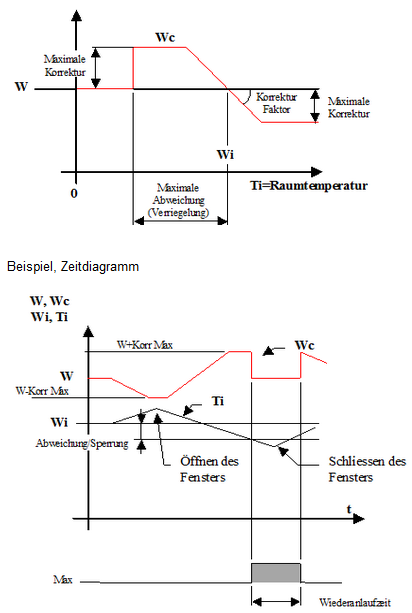
#### Diagramm
W = rSupplyTempIn (Vorlaufsolltemperatur aus Heizkurve)\
Wi = rSetPointRoom (Solltemperatur Raum)\
Ti = rRoomTemp (Aktuelle Raumtemperatur)\
Wc = rSupplyTempOut (korrigierte Vorlaufsolltemperatur)\
Max = xMax (Überschreitung der maximalen Differenz der Raumtemperatur. (FALSE = nicht aktiv, TRUE = aktiv))
### CODESYS
InOut:
| Scope | Name | Type | Initial |
| ----------- | ---------------- | ------- | ------------ |
| Input | `rSupplyTempIn` | `REAL` | 0 |
| Input | `rSetPointRoom` | `REAL` | 0 |
| Input | `rRoomTemp` | `REAL` | 0 |
| Input Const | `tMaxTime` | `TIME` | TIME#2m0s0ms |
| Input Const | `rMaxLevel` | `REAL` | 5 |
| Input Const | `rCorNeg` | `REAL` | -2 |
| Input Const | `rCorPos` | `REAL` | 2 |
| Input Const | `rFactor` | `REAL` | 1 |
| Input Const | `rManValue` | `REAL` | 0 |
| Input Const | `eManModeN` | eManNum | eManNum.Auto |
| Output | `rSupplyTempOut` | `REAL` | |
| Output | `xMax` | `BOOL` | |
| Output | `rCorrection` | `REAL` | |
| Output | `xAuto` | `BOOL` | |
| Output | `tDelay` | `TIME` | |
---
# Agent Instructions
This documentation is published with GitBook. GitBook is the documentation platform designed so that both humans and AI agents can read, navigate, and reason over technical content effectively. Learn more at gitbook.com.
## Querying This Documentation
If you need additional information that is not directly available in this page, you can query the documentation dynamically by asking a question.
Perform an HTTP GET request on the current page URL with the `ask` query parameter, and the optional `goal` query parameter:
```
GET https://support.powerio.com/hub/codesys-hvac/hvac-library/functionblocks/setpoint/setpointcorrection.md?ask=&goal=
```
`ask` is the immediate question: it should be specific, self-contained, and written in natural language.
`goal` is optional and describes the broader end goal you are ultimately trying to accomplish on behalf of the user. GitBook uses it to tailor the answer towards what is most useful for that goal.
The response will contain a direct answer to the question and relevant excerpts and sources from the documentation.
Use this mechanism when the answer is not explicitly present in the current page, you need clarification or additional context, or you want to retrieve related documentation sections.