> For the complete documentation index, see [llms.txt](https://support.powerio.com/hub/llms.txt). Markdown versions of documentation pages are available by appending `.md` to page URLs; this page is available as [Markdown](https://support.powerio.com/hub/codesys-hvac/hvac-library/functionblocks/setpoint/editstring.md).
# EditString
## `EditString` (FB)
FUNCTION\_BLOCK EditString
### Kurzbeschreibung
> Eingabe einer Zeichenkette\
> Typische Anwendung: Festlegung des Namens eines Heizkreises
### Darstellung
### Schnittstellen
#### Ausgänge
| Name | Datentyp | Wertebereich | Initialwert | Funktion |
| ------ | -------- | ------------ | ----------- | -------------------------- |
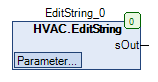
| *sOut* | STRING | | | Ausgabewert vom Typ STRING |
#### Sollwerte / Parameter
| Name | Datentyp | Wertebereich | Initialwert | Funktion |
| ------------- | -------- | ------------ | ----------- | -------------------------- |
| **sSetPoint** | STRING | | ‘’ | Eingabewert vom Typ STRING |
### Funktionsbeschreibung
#### Allgemeines
Dieser Funktionsbaustein dient zur Übergabe eines Eingabewerts vom Typ STRING **sSetPoint** und die direkte Übertragung zum Ausgabewert vom Typ STRING *sOut*.
{% hint style="warning" %}
**Verhalten bei Spannungsausfall**
Der Eingabewert vom Typ STRING **sSetPoint** wird spannungsausfallsicher gespeichert und automatisch wiederhergestellt.
{% endhint %}
### Visualisierung
Passendes Visualisierungselement aus der HVACV Visu Library: **EditString**
#### Darstellung
#### Schnittstellen Visu-Element
| Name | Datentyp | Typ | Initialwert | Funktion |
| ---------------- | -------- | ------------ | ----------- | -------------------------------------------------------------------------------------------------------------------------- |
| **rString** | STIRNG | VAR\_IN\_OUT | | String Eingabewert Bsp. HVAC.EditString.sSetPoint |
| **sDialogTitle** | STRING | VAR\_INPUT | | Titel im Stringformat eingeben z.B: ‘Eingabe Raumtemperatur’ - erscheint im Numpad bei der Eingabe. |
| **iFieldSizeL** | INT | VAR\_INPUT | 0 | Feld vergößert sich um Anzahl der eingegebenen Pixel nach links. Wird benötigt um lange Zahlen oder Einheiten anzuzeigen. |
| **iFieldSizeR** | INT | VAR\_INPUT | 0 | Feld vergößert sich um Anzahl der eingegebenen Pixel nach rechts. Wird benötigt um lange Zahlen oder Einheiten anzuzeigen. |
{% hint style="info" %}
Hinweis: VAR\_IN\_OUT Schnittstellen müssen belegt werden, VAR\_INPUT sind optional.
{% endhint %}
### CODESYS
InOut:
| Scope | Name | Type | Initial |
| ----------- | ----------- | -------- | ------- |
| Input Const | `sSetPoint` | `STRING` | ‘’ |
| Output | `sOut` | `STRING` | |
---
# Agent Instructions
This documentation is published with GitBook. GitBook is the documentation platform designed so that both humans and AI agents can read, navigate, and reason over technical content effectively. Learn more at gitbook.com.
## Querying This Documentation
If you need additional information that is not directly available in this page, you can query the documentation dynamically by asking a question.
Perform an HTTP GET request on the current page URL with the `ask` query parameter, and the optional `goal` query parameter:
```
GET https://support.powerio.com/hub/codesys-hvac/hvac-library/functionblocks/setpoint/editstring.md?ask=&goal=
```
`ask` is the immediate question: it should be specific, self-contained, and written in natural language.
`goal` is optional and describes the broader end goal you are ultimately trying to accomplish on behalf of the user. GitBook uses it to tailor the answer towards what is most useful for that goal.
The response will contain a direct answer to the question and relevant excerpts and sources from the documentation.
Use this mechanism when the answer is not explicitly present in the current page, you need clarification or additional context, or you want to retrieve related documentation sections.