> For the complete documentation index, see [llms.txt](https://support.powerio.com/hub/llms.txt). Markdown versions of documentation pages are available by appending `.md` to page URLs; this page is available as [Markdown](https://support.powerio.com/hub/codesys-hvac/poweriohw-hardware-library/description.md).

# Beschreibung

{% columns %}
{% column width="25%" %}

<figure><img src="/files/6PriBgT6Zrr0TIbUw01B" alt="" width="100"><figcaption></figcaption></figure>
{% endcolumn %}

{% column width="75%" %}
Die POWERIOHW Library ermöglicht die Ansteuerung des Systems und der Onboard I/Os von IEC CODESYS Anwendung für kompatible powerIO Geräte der Serie H1 und T1.
{% endcolumn %}
{% endcolumns %}

***

Damit Sie direkt loslegen können, bieten wir Ihnen die Bibliothek als Download an. Eine Lizenz wird für die Verwendung nicht benötigt. Sollten Sie weitere Unterstützung benötigen, so zögern Sie bitte nicht uns zu kontaktieren.

<a href="/spaces/0iNqm20Eubny3McJVgbJ/pages/aPqFQ2i5X7Yx3bidnvKJ" class="button primary" data-icon="up-right-from-square">Zum Downloads</a> <a href="https://www.powerio.com/de/kontakt" class="button secondary" data-icon="question">Unterstützung erhalten</a>

{% hint style="info" %}
**Lizenzierung:**

Dieses Produkt ist ohne Lizenzerwerb uneingeschränkt nutzbar.
{% endhint %}

### Übersicht

{% columns %}
{% column width="91.66666666666666%" %}

<figure><img src="/files/umXMY9xqGOz6Z25WEISA" alt="" width="224"><figcaption></figcaption></figure>

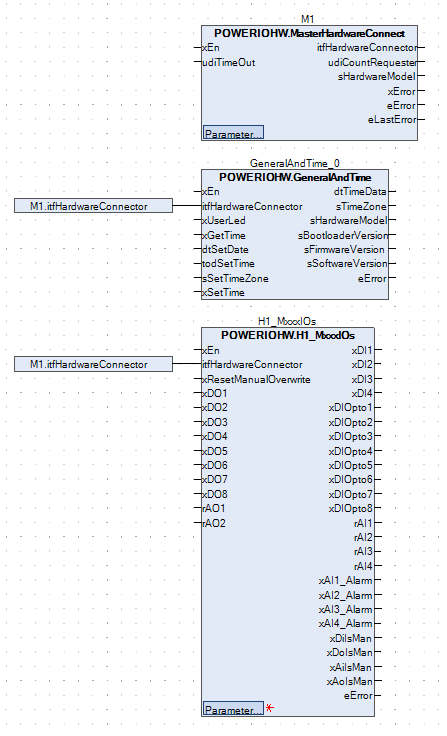
<p align="center"><em>Aufbau nach dem Master und Slave Prinzip. Verwendung der Onboard I/Os und Systemuhrzeit auslesen und ändern.</em></p>
{% endcolumn %}

{% column width="8.333333333333343%" %}

{% endcolumn %}
{% endcolumns %}

***

### Beschreibung

Mit dieser Bibliothek können Sie die unterstützen Geräte von powerIO direkt aus CODESYS in IEC-Code Ansteuern und relevante Daten auslesen.

Damit kann die Uhrzeit des Systems gesetzt und ausgelesen werden. Weiterhin können sie damit die I/Os vom Gerät verwenden.

### Details

| **Dokumentation Version**      | <code class="expression">space.vars.POWERIOHW\_Library\_latest</code> |
| ------------------------------ | --------------------------------------------------------------------- |
| **Platzhalter**                | `POWERIOHW`                                                           |
| **Verfügbar in CODESYS Store** | *Nein*                                                                |
| **Programmiersystem**          | *CODESYS V3.5.17.2 oder höher*                                        |
| **Laufzeitsystem**             | *CODESYS Control V4.2.0.0 oder höher*                                 |
| **Lizenz**                     | Lizenzfrei                                                            |

***


---

# Agent Instructions
This documentation is published with GitBook. GitBook is the documentation platform designed so that both humans and AI agents can read, navigate, and reason over technical content effectively. Learn more at gitbook.com.

## Querying This Documentation
If you need additional information that is not directly available in this page, you can query the documentation dynamically by asking a question.

Perform an HTTP GET request on the current page URL with the `ask` query parameter, and the optional `goal` query parameter:

```
GET https://support.powerio.com/hub/codesys-hvac/poweriohw-hardware-library/description.md?ask=<question>&goal=<endgoal>
```

`ask` is the immediate question: it should be specific, self-contained, and written in natural language.
`goal` is optional and describes the broader end goal you are ultimately trying to accomplish on behalf of the user. GitBook uses it to tailor the answer towards what is most useful for that goal.

The response will contain a direct answer to the question and relevant excerpts and sources from the documentation.

Use this mechanism when the answer is not explicitly present in the current page, you need clarification or additional context, or you want to retrieve related documentation sections.
