> For the complete documentation index, see [llms.txt](https://support.powerio.com/hub/llms.txt). Markdown versions of documentation pages are available by appending `.md` to page URLs; this page is available as [Markdown](https://support.powerio.com/hub/codesys-hvac/hvac-library/functionblocks/numeric/absa.md).
# AbsA
## `AbsA` (FB)
FUNCTION\_BLOCK AbsA
### Kurzbeschreibung
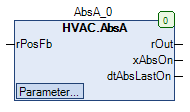
> Antiblockierschutz für ein analoges Signal
### Darstellung
### Schnittstellen
#### Eingänge
| Name | Datentyp | Wertebereich | Initialwert | Funktion |
| -------- | -------- | ------------ | ----------- | -------------------- |
| *rPosFb* | REAL | | | Positionsrückmeldung |
#### Ausgänge
| Name | Datentyp | Wertebereich | Initialwert | Funktion |
| ------------- | --------------- | ------------ | ----------- | --------------------------------------------------------- |
| *rOut* | REAL | | | Analog - Ausgang |
| *xAbsOn* | BOOL | | | Anzeige - Blockierschutzprozess |
| *dtAbsLastOn* | DATE\_AND\_TIME | | | Startdatum/-zeitpunkt der letzten Blockierschutzprozesses |
#### Sollwerte / Parameter
| Name | Datentyp | Wertebereich | Initialwert | Funktion |
| ---------------- | -------- | ------------ | ------------ | --------------------------------------------- |
| **rMinChange** | REAL | | 10.0 | Minimale Positionsänderung |
| **tTime** | TIME | | 180s | Zeitdauer des Blockierschutzprozesses |
| **eDay** | eDoW | | eDow\.Montag | Wochentag des Blockierschutzprozesses |
| **todStartTime** | TOD | | 08:00:00 Uhr | Startzeitpunkt des Blockierschutzprozesses |
| **rMinLimit** | REAL | | 0 | Untere Grenze für den Analog - Ausgang *rOut* |
| **rMaxLimit** | REAL | | 100 | Obere Grenze für den Analog - Ausgang *rOut* |
### Funktionsbeschreibung
#### Allgemeines
Dieser Funktionsbaustein dient zur Überwachung der Positionsrückmeldung *rPosFb* auf Aktivität. Der Prüfzeitraum umfasst dabei jeweils 168 Stunden (= 1 Woche).\
Die Positionsrückmeldung *rPosFb* ist aktiv, falls sich ihr Wert im Prüfzeitraum um einen Betrag größer als die minimale Positionsänderung **rMinChange** geändert hat.\
Der Blockierschutzprozess wird damit unterbunden (= Blockierschutzprozess nicht aktiv), die Prüfzeit startet startet erneut.\
\
Wurde während des Prüfzeitraums keine Aktivität erfasst, so wird der Blockierschutzprozess mit der Zeitdauer **tTime** am Wochentag **eDay** zur Uhrzeit **todStartTime** ausgelöst. (= Blockierschutzprozess aktiv).\
Gleichzeitig startet die Prüfzeitdauer erneut.\
\
Während des Blockierschutzprozesses werden am Analog - Ausgang *rOut* je nach aktuellem Wert an der Positionsrückmeldung *rPosFb* zum Beginn des Blockierschutzprozesses unterschiedliche Signale ausgegeben.\
\
Bedingung 1: *rPosFb* > 51% der oberen Grenze für den Analog - Ausgang *rOut*:\
\
*rOut* = **rMinLimit**\
\
Bedingung 2: *rPosFb* <= 51% der oberen Grenze für den Analog - Ausgang *rOut*:\
\
*rOut* = **rMaxLimit**\
\
Bei nicht aktivem Blockierschutzprozesses wird am Analog - Ausgang *rOut* der Wert 0.0 ausgegeben.\
\
Die erstmalige Auslösung der Blockierschutzprozesses kann je nach den relevanten Einstellungen (Wochentag **eDay** und **todStartTime**) verzögert sein (Beispiel: Prüfzeit am Dienstagmorgen beendet, Auslösung des Blockierschutzprozesses erst am kommenden Montag).\
\
Am Ausgang *dtAbsLastOn* steht das Startdatum und der Startzeitpunkt der letzten Blockierschutzprozesses zur Verfügung.
{% hint style="info" %}
**Voraussetzung für den Einsatz des Funktionsbausteins AbsA**
Zur korrekten Funktion ist der Einsatz des Funktionsbausteins TimeRead2 erforderlich.
{% endhint %}
#### Anzeige - Blockierschutzprozess *xAbsOn*
Dieser Ausgang dient zur Anzeige eines aktiven Blockierschutzprozesses (*xAbsOn* = TRUE).
#### Sollwert / Parameter **eDay**
Die Blockierschutzfunktion kann durch die Einstellung **eDay** = eDow\.Inactive generell gesperrt werden.
#### Sollwert / Parameter **tTime**
Die Blockierschutzfunktion kann durch die Einstellung **tTime** = 0s generell gesperrt werden.
### CODESYS
InOut:
| Scope | Name | Type | Initial |
| ----------- | -------------- | ------ | ----------------- |
| Input | `rPosFb` | `REAL` | |
| Input Const | `rMinChange` | `REAL` | 10 |
| Input Const | `tTime` | `TIME` | TIME#3m0s0ms |
| Input Const | `eDay` | eDoW | eDow\.Monday |
| Input Const | `todStartTime` | `TOD` | TIME\_OF\_DAY#8:0 |
| Input Const | `rMinLimit` | `REAL` | 0 |
| Input Const | `rMaxLimit` | `REAL` | 100 |
| Output | `rOut` | `REAL` | |
| Output | `xAbsOn` | `BOOL` | |
| Output | `dtAbsLastOn` | `DT` | |
---
# Agent Instructions
This documentation is published with GitBook. GitBook is the documentation platform designed so that both humans and AI agents can read, navigate, and reason over technical content effectively. Learn more at gitbook.com.
## Querying This Documentation
If you need additional information that is not directly available in this page, you can query the documentation by asking a question.
Perform an HTTP GET request on the following URL with the `ask` and `goal` query parameters:
```
GET https://support.powerio.com/hub/codesys-hvac/hvac-library/functionblocks/numeric/absa.md?ask=&goal=
```
`ask` is the immediate question: it should be specific, self-contained, and written in natural language.
`goal` is what the user is ultimately trying to achieve, the reason they need the answer. Sharing it helps GitBook give you a better, more relevant answer. A goal is most helpful when it describes the outcome the user wants rather than restating the question. For example, with `ask=how do I create an API token`, a goal like `automate deployments from our CI pipeline` lets GitBook tailor the answer to that use case.
The response will contain a direct answer to the question and relevant excerpts and sources from the documentation.
Use this mechanism when the answer is not explicitly present in the current page, you need clarification or additional context, or you want to retrieve related documentation sections.