> For the complete documentation index, see [llms.txt](https://support.powerio.com/hub/llms.txt). Markdown versions of documentation pages are available by appending `.md` to page URLs; this page is available as [Markdown](https://support.powerio.com/hub/codesys-hvac/hvac-library/functionblocks/numeric/twopoint.md).
# TwoPoint
## `TwoPoint` (FB)
FUNCTION\_BLOCK TwoPoint
### Kurzbeschreibung
> Lineare Umwandlung eines nummerischen Eingangswertes durch eine durch zwei Punkte definierte Kennlinie.
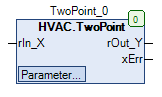
### Darstellung
### Schnittstellen
#### Eingänge
| Name | Datentyp | Wertebereich | Initialwert | Funktion |
| -------- | -------- | ------------ | ----------- | ----------------- |
| *rIn\_X* | REAL | | 0 | Analogwerteingang |
#### Ausgänge
| Name | Datentyp | Wertebereich | Initialwert | Funktion |
| --------- | -------- | ------------ | ----------- | ------------------------------------------------------------------------------------------------------------------------- |
| *rOut\_Y* | REAL | | | Analogwertausgang |
| *xErr* | BOOL | | |
\* FALSE: Umwandlung fehlerfrei \* TRUE: Fehler beim Umwandlungsprozess
|
#### Sollwerte / Parameter
| Name | Datentyp | Wertebereich | Initialwert | Funktion |
| ----------------- | -------- | ------------ | ----------- | ----------------------------------------------------------------- |
| **iMinMaxOffset** | INTEGER | | 0 | Werte der Begrenzungen am Analogwertausgang *rOut\_Y* |
| **xMinMaxLimit** | BOOL | | FALSE | Freigabe / Sperrung der Begrenzung am Analogwertausgang *rOut\_Y* |
| **rY2** | REAL | | 100 | Punkt 2 der Ausgangskennlinie |
| **rX2** | REAL | | 100 | Punkt 2 des Eingangsbereiches |
| **rY1** | REAL | | 0 | Punkt 1 der Ausgangskennlinie |
| **rX1** | REAL | | 0 | Punkt 1 des Eingangsbereiches |
### Funktionsbeschreibung
#### Analogwertausgang *rOut\_Y*
Der Analogwertausgang *rOut\_Y* wird vom Analogwerteingang *rIn\_X* in Abhängigkeit der durch die beiden Punkte P1(**rX1**/**rY1**) und P2(**rX2**/**rY2**) bestimmten linearen Kennlinie berechnet.\
Im Falle eines Konvertierungsfehlers ( *xErr* = TRUE ) bleibt der Analogwertausgang *rOut\_Y* unverändert.
{% hint style="info" %}
**Formel**
rOut\_Y = (((rX1-rIn\_X)\*(rY2-rY1))/(rX1-rX2))+rY1
**Einschränkungen**
Der Analogwertausgang *rOut\_Y* ist vom Datentyp REAL. Durch eine ungeeignete Auswahl der Parameter **rX1**, **rX2**, **rY1** und **rY2** sowie des Wertes des Analogwerteingangs *rIn\_X* kann es zu einer Überschreitung der Grenzen des Datentyps kommen.
{% endhint %}
#### Freigabe / Sperrung der Begrenzungen **xMinMaxLimit**
Die Begrenzungen des Analogwertausgangs *rOut\_Y* können mit diesem Sollwert / Parameter generell freigegeben und gesperrt werden.
| **xMinMaxLimit** | Begrenzungen | Hinweise |
| ---------------- | ----------------- | ------------------------------------------------- |
| FALSE | keine | *rOut\_Y* ohne absolute Begrenzungen |
| TRUE | Y\_min und Y\_max | Begrenzung des Analogwertausgangs *rOut\_Y* aktiv |
#### Werte der Begrenzungen **iMinMaxOffset**
Die Begrenzungen des Analogwertausgangs sind nur dann aktiv, falls der Sollwert / Parameter **xMinMaxLimit** aktiv (= TRUE) ist.\
Die Grenzwerte Y\_min und Y\_max werden dann wie folgt berechnet:
{% hint style="info" %}
**Formeln:**
Y\_min = rY1 - ((ABS(rY2-rY1))\*iMinMaxOffset)/100\
Y\_max = rY2 + ((ABS(rY2-rY1))\*iMinMaxOffset)/100\\
{% endhint %}
| *rY1* | *rY2* | *rY2* - *rY1* | **iMinMaxOffset** | *Y\_min* | *Y\_max* | Hinweise |
| ----- | ----- | ------------- | ----------------- | -------- | -------- | --------------------- |
| 0 | 100 | 100 | 0 | 0 | 100 | Standard-Begrenzungen |
| 0 | 100 | 100 | 10 | -10 | 110 | Positiver Offset |
| 0 | 100 | 100 | -10 | 10 | 90 | Negativer Offset |
#### Digitalausgang *xErr*
Der digitale Ausgang *xErr* signalisiert einen Fehler beim Umwandlungsprozess. Folgende Fehler werden berücksichtigt:
* *rX1* UND *rX2* = 0
* *rX1* = *rX2*
* *rY1* UND *rY2* = 0
* *rY1* = *rY2*
| Fehler beim Umwandlungsprozess | *xErr* | Hinweise |
| ------------------------------ | ------ | ------------------------------ |
| FALSE | FALSE | Umwandlung fehlerfrei |
| TRUE | TRUE | Fehler beim Umwandlungsprozess |
Legende: X = beliebig
### CODESYS
InOut:
| Scope | Name | Type | Initial |
| ----------- | --------------- | ------ | ------- |
| Input | `rIn_X` | `REAL` | 0 |
| Output | `rOut_Y` | `REAL` | |
| Output | `xErr` | `BOOL` | |
| Input Const | `iMinMaxOffset` | `INT` | 0 |
| Input Const | `xMinMaxLimit` | `BOOL` | FALSE |
| Input Const | `rY2` | `REAL` | 100 |
| Input Const | `rX2` | `REAL` | 100 |
| Input Const | `rY1` | `REAL` | 0 |
| Input Const | `rX1` | `REAL` | 0 |
---
# Agent Instructions
This documentation is published with GitBook. GitBook is the documentation platform designed so that both humans and AI agents can read, navigate, and reason over technical content effectively. Learn more at gitbook.com.
## Querying This Documentation
If you need additional information that is not directly available in this page, you can query the documentation dynamically by asking a question.
Perform an HTTP GET request on the current page URL with the `ask` query parameter, and the optional `goal` query parameter:
```
GET https://support.powerio.com/hub/codesys-hvac/hvac-library/functionblocks/numeric/twopoint.md?ask=&goal=
```
`ask` is the immediate question: it should be specific, self-contained, and written in natural language.
`goal` is optional and describes the broader end goal you are ultimately trying to accomplish on behalf of the user. GitBook uses it to tailor the answer towards what is most useful for that goal.
The response will contain a direct answer to the question and relevant excerpts and sources from the documentation.
Use this mechanism when the answer is not explicitly present in the current page, you need clarification or additional context, or you want to retrieve related documentation sections.
%20(1).png?alt=media)