> For the complete documentation index, see [llms.txt](https://support.powerio.com/hub/llms.txt). Markdown versions of documentation pages are available by appending `.md` to page URLs; this page is available as [Markdown](https://support.powerio.com/hub/codesys-hvac/en/hvac-library/functionblocks/general/maninfo.md).
# ManInfo
## `ManInfo` (FB)
FUNCTION\_BLOCK ManInfo EXTENDS LAT.Element IMPLEMENTS IManInfoProtocol, IMan
### Short description
> Status display for the manual override of function blocks\
> Application: Generation of a user notice in the event of a manual override
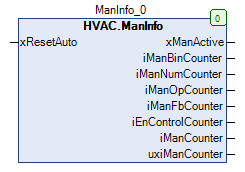
### Representation
### Interfaces
#### Inputs
| Name | Data type | Value range | Initial value | Function |
| ------------ | --------- | ----------- | ------------- | ----------- |
| *xResetAuto* | BOOL | | | Reset input |
#### Outputs
| Name | Data type | Value range | Initial value | Function |
| ------------------- | --------- | ----------- | ------------- | ---------------------------------------------------------- |
| *xManActive* | BOOL | | FALSE | Status display - manual overrides |
| *iManBinCounter* | INT | | 0 | Number of binary manual overrides |
| *iManNumCounter* | INT | | 0 | Number of numerical manual overrides |
| *iManOpCounter* | INT | | 0 | Number of manual overrides on the operating mode selectors |
| *iManFbCounter* | INT | | 0 | Number of function blocks in manual mode |
| *iEnControlCounter* | INT | | 0 | Number of disabled function enables |
| *iManCounter* | INT | | 0 | Total number of manual overrides |
| *udiManCounter* | CAA.Count | | | Number of monitored slave function blocks |
### Functional description
#### General
This function block is used for status display for the manual override of function blocks.\
All function blocks are taken into account that have a binary or numerical output with manual override, perform a mode change, can be operated in different modes, or have an enable input.
#### Reset input *xResetAuto*
Every rising edge at the reset input causes all monitored function blocks to immediately switch to automatic mode.
#### Status display - manual overrides *xManActive*
The status indicator is TRUE if at least one manual override is active.\
The status indicator is FALSE if no manual override is active.
#### Number of binary manual overrides *iManBinCounter*
This output continuously displays the current number of binary manual overrides.
#### Number of numerical manual overrides *iManNumCounter*
This output continuously displays the current number of numerical manual overrides.
#### Number of manual overrides on the operating mode selectors *iManOpCounter*
This output continuously displays the current number of manual overrides on the operating mode selectors.
#### Number of function blocks in manual mode *iManFbCounter*
This output continuously displays the current number of function blocks in manual mode.
#### Number of disabled function enables *iEnControlCounter*
This output continuously displays the current number of disabled function enables.
#### Total number of manual overrides *iManCounter*
This output continuously displays the current total number of manual overrides.
#### *udiManCounter*
This output continuously displays the current number of monitored slave function blocks.
### CODESYS
InOut:
| Scope | Name | Type | Initial |
| ------ | ------------------- | ----------- | ------- |
| Input | `xResetAuto` | `BOOL` | |
| Output | `xManActive` | `BOOL` | 0 |
| Output | `iManBinCounter` | `INT` | 0 |
| Output | `iManNumCounter` | `INT` | 0 |
| Output | `iManOpCounter` | `INT` | 0 |
| Output | `iManFbCounter` | `INT` | 0 |
| Output | `iEnControlCounter` | `INT` | 0 |
| Output | `iManCounter` | `INT` | 0 |
| Output | `udiManCounter` | `CAA.COUNT` | |
---
# Agent Instructions
This documentation is published with GitBook. GitBook is the documentation platform designed so that both humans and AI agents can read, navigate, and reason over technical content effectively. Learn more at gitbook.com.
## Querying This Documentation
If you need additional information that is not directly available in this page, you can query the documentation by asking a question.
Perform an HTTP GET request on the following URL with the `ask` and `goal` query parameters:
```
GET https://support.powerio.com/hub/codesys-hvac/en/hvac-library/functionblocks/general/maninfo.md?ask=&goal=
```
`ask` is the immediate question: it should be specific, self-contained, and written in natural language.
`goal` is what the user is ultimately trying to achieve, the reason they need the answer. Sharing it helps GitBook give you a better, more relevant answer. A goal is most helpful when it describes the outcome the user wants rather than restating the question. For example, with `ask=how do I create an API token`, a goal like `automate deployments from our CI pipeline` lets GitBook tailor the answer to that use case.
The response will contain a direct answer to the question and relevant excerpts and sources from the documentation.
Use this mechanism when the answer is not explicitly present in the current page, you need clarification or additional context, or you want to retrieve related documentation sections.