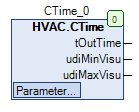

CTime
CTime (FB)
CTime (FB)FUNCTION_BLOCK CTime
Short description
Conversion of a time input (UDINT) into a time output (TIME). The scaling for the time input can be selected. Automatic calculation of min/max limits for the input as well as monitoring of the input.
Representation

Interfaces
Inputs
Outputs
tOutTime
TIME
0 … 4294967295ms
Time value in TIME format
udiMinVisu
UDINT
Display of tMinTime for the visualization
udiMaxVisu
UDINT
Display of tMaxTime for the visualization
Setpoints / parameters
udiTime
UDINT
0 … 4294967295
Time input (absolute limits: 0..7 days) depending on scaling
eTimeScale
eTime
Second, Minute, Hour
eTime.Second
Definition of the scaling of the time input (seconds, minutes, hours)
tMinTime
TIME
0 … 4294967295ms
0s
Lower limit for the time input udiTime
tMaxTime
TIME
0 … 4294967295ms
2h
Upper limit for the time input udiTime
Function description
General
This function block is used to convert a time input udiTime into a time output tOutTime. The scaling for the time input udiTime is done via the setpoint and parameters eTimeScale. The time input is absolutely limited to a value range of 0 … 7 days. The time input is limited by a lower limit tMinTime and an upper limit tMaxTime as well, both limits are also subject to the scaling. The time output tOutTime is correspondingly also limited to the range tMinTime - tMaxTime . If the lower limit exceeds tMinTime the upper limit tMaxTime, the lower limit tMinTime is reduced to the upper limit. This block can for example be used for input in a visualization.\
Visualization
Matching visualization element from the HVACV Visu Library: CTime and CTime_single_input
Representation

Interfaces visual element
FB_CTime
CTime
VAR_IN_OUT
Enter FB instance CTime here e.g. PRG.CTime
sDialogTitle
STRING
VAR_INPUT
Enter the title in string format e.g.: 'Input room temperature' - appears on the numpad during entry.
iFieldSizeL
INT
VAR_INPUT
0
Field enlarges by the number of entered pixels to the left. Required to display long numbers or units.
iFieldSizeR
INT
VAR_INPUT
0
Field enlarges by the number of entered pixels to the right. Required to display long numbers or units.
The unit seconds 's', minutes 'm' or hours 'h' is automatically adjusted via the setting in the FB CTime. The MIN and MAX input limits are also automatically generated by the FB and adapted in the visual element. Can be changed at runtime! || Note: VAR_IN_OUT interfaces must be assigned, VAR_INPUT are optional. ||
The visualization element CTime_single_input works like CTime however all inputs must be entered separately via the interfaces. Thus you can also use this visualization element without your CTime block.
Interfaces Visu-Element CTime_single_input
udiTime
UDINT
VAR_IN_OUT
Enter the UDINT variable here.
eTimeScale
HVAC.eTime
VAR_INPUT
Here the enum eTimeScale can be entered. Displays whether second, minute or hour.
udiMinVisu
UDINT
VAR_INPUT
0
Here the MIN input limit can be entered. Inputs below it will not be accepted by the visualization.
udiMaxVisu
UDINT
VAR_INPUT
7200
Here the MAX input limit can be entered. Inputs above it will not be accepted by the visualization.
sDialogTitle
STRING
VAR_INPUT
Enter the title in string format e.g.: 'Input post-run time' - appears on the numpad during entry.
iFieldSizeL
INT
VAR_INPUT
0
Field enlarges by the number of entered pixels to the left. Required to display long numbers or units.
iFieldSizeR
INT
VAR_INPUT
0
Field enlarges by the number of entered pixels to the right. Required to display long numbers or units.
CODESYS
InOut:
Input Const
tMaxTime
TIME
TIME#120m0s0ms
Input Const
tMinTime
TIME
TIME#0ms
Input Const
eTimeScale
eTime
eTime.Second
Input Const
udiTime
UDINT
Output
tOutTime
TIME
Output
udiMinVisu
UDINT
Output
udiMaxVisu
UDINT
Last updated

