> For the complete documentation index, see [llms.txt](https://support.powerio.com/hub/llms.txt). Markdown versions of documentation pages are available by appending `.md` to page URLs; this page is available as [Markdown](https://support.powerio.com/hub/codesys-hvac/en/hvac-library/functionblocks/clock/clockmaster32.md).
# ClockMaster32
## `ClockMaster32` (FB)
FUNCTION\_BLOCK ClockMaster32 EXTENDS LAT.Element IMPLEMENTS IUhrProtocol, IUhr
### Short description
> Master function block for a clock system with 32 weekly clocks, 30 public holidays, 10 holiday periods and 5 special switching times.\
> The weekly clocks each contain one on and one off time per weekday (448 switching points).\
> Furthermore, 30 public holidays (country-specific), 10 holiday periods (start and end date) as well as 5 special switching times (on and off time as well as date) can be defined.
### Representation
### Functional description
#### General
This function block serves as the master function block for a clock system with 32 weekly clocks, 30 public holidays, 10 holiday periods and 5 special switching times.\
It allows the user (visualization) to specify the time or date values and, taking the current time and current date into account, makes the resulting states (weekly clock channel 1 - 32, public holidays channel, holiday channel and special switching times channel) available to the maximum of 63 slave function blocks ClockSlave32.\
In the slave function blocks, assignment to the channels (weekly clock channel 1 - 32, public holidays channel, holiday channel and special switching times channel) is now carried out by binary variables (FALSE = not assigned, TRUE = assigned).\
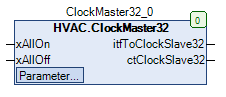
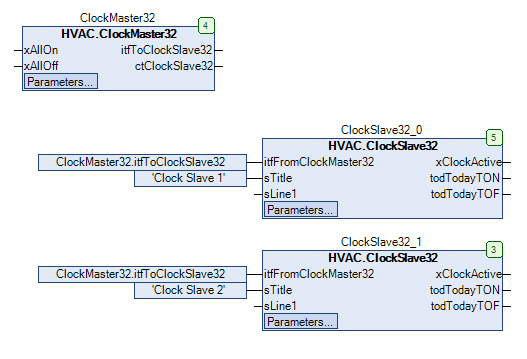
The connection between the master function block and the slave function blocks is made via the output *itfToClockSlave32* or the inputs \*itfFromClockMaster32 \*.\
The inputs *xAllOn* or *xAllOff* allow (input = TRUE) the central activation/deactivation of all outputs *xClockActive* of all connected slave function blocks.\
The input *xAllOff* has a higher priority than the input *xAllOn* higher priority.\
\
The following function blocks are used to define the time or date values:
Clock7d1Ch
PublicHoliday
Holiday
SwitchTimeS
Example representation in combination with slave clocks:
### Visualization
#### Representation
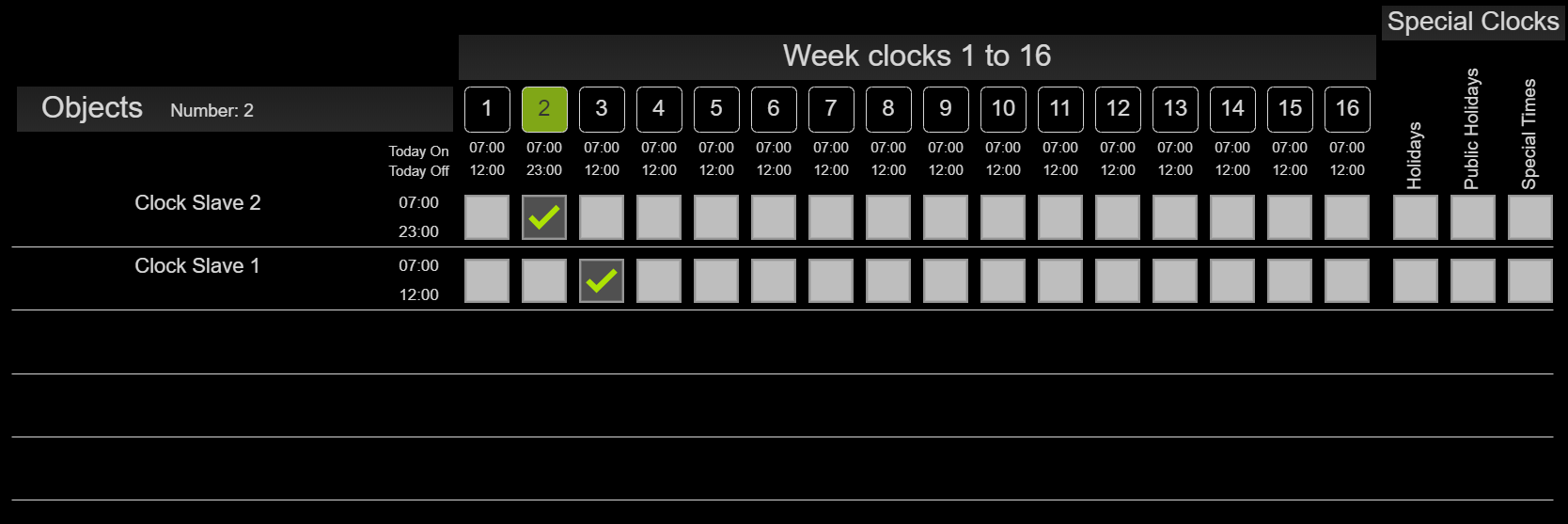
> The slave clocks are automatically appended in the order in which they are called in the program. The maximum number is limited to 144 slave clocks in the Visu element. In ClockMaster32, the maximum number can be adjusted via the library constant.
#### Interfaces visualization element
| Name | Data type | Type | Initial value | Function |
| --------------------- | ------------- | ------------ | ------------- | -------------------------------------------------------------------------------------------------------------------------------------------------------------------------------------------------------------------------- |
| **FB\_ClockMaster32** | ClockMaster32 | VAR\_IN\_OUT | | Enter FB ClockMaster32 here e.g. PRG.ClockMaster32 |
| **BMS\_Active** | BOOL | VAR\_INPUT | | BMS (Building Management System) GLT (building management technology). If BMS\_Active = TRUE, input / editing of the clocks is disabled, since they can then only be set via the BMS. Time values can then only be viewed. |
| **DisableInput** | BOOL | VAR\_INPUT | | DisableInpput = TRUE The time values of the weekly clocks can only be viewed and not edited. |
\
Note: VAR\_IN\_OUT interfaces must be assigned; VAR\_INPUT is optional.
### CODESYS
InOut:
| Scope | Name | Type | Initial |
| ----------- | ------------------- | ----------------- | ---------------------------------- |
| Input | `xAllOn` | `BOOL` | |
| Input | `xAllOff` | `BOOL` | |
| Input Const | `eCountry` | eCountryList | eCountryList.DE |
| Input Const | `ActiveClocksVisu` | eActiveClocksVisu | eActiveClocksVisu.Activate16Clocks |
| Output | `itfToClockSlave32` | `IUhrProtocol` | THIS^ |
| Output | `ctClockSlave32` | `CAA.COUNT` | |
---
# Agent Instructions
This documentation is published with GitBook. GitBook is the documentation platform designed so that both humans and AI agents can read, navigate, and reason over technical content effectively. Learn more at gitbook.com.
## Querying This Documentation
If you need additional information that is not directly available in this page, you can query the documentation by asking a question.
Perform an HTTP GET request on the following URL with the `ask` and `goal` query parameters:
```
GET https://support.powerio.com/hub/codesys-hvac/en/hvac-library/functionblocks/clock/clockmaster32.md?ask=&goal=
```
`ask` is the immediate question: it should be specific, self-contained, and written in natural language.
`goal` is what the user is ultimately trying to achieve, the reason they need the answer. Sharing it helps GitBook give you a better, more relevant answer. A goal is most helpful when it describes the outcome the user wants rather than restating the question. For example, with `ask=how do I create an API token`, a goal like `automate deployments from our CI pipeline` lets GitBook tailor the answer to that use case.
The response will contain a direct answer to the question and relevant excerpts and sources from the documentation.
Use this mechanism when the answer is not explicitly present in the current page, you need clarification or additional context, or you want to retrieve related documentation sections.