> For the complete documentation index, see [llms.txt](https://support.powerio.com/hub/llms.txt). Markdown versions of documentation pages are available by appending `.md` to page URLs; this page is available as [Markdown](https://support.powerio.com/hub/codesys-hvac/hvac-library/functionblocks/damping/dampingt1.md).
# DampingT1
## `DampingT1` (FB)
FUNCTION\_BLOCK DampingT1
### Kurzbeschreibung
> Zeitliche Filterung eines analogen Eingangssignals\
> \
> Typische Anwendung: Filterung eines Sensor-Rohwerts
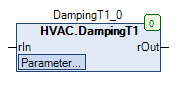
### Darstellung
### Schnittstellen
#### Eingänge
| Name | Datentyp | Wertebereich | Initialwert | Funktion |
| ----- | -------- | ------------ | ----------- | ----------------- |
| *rIn* | REAL | | | Analogwerteingang |
#### Ausgänge
| Name | Datentyp | Wertebereich | Initialwert | Funktion |
| ------ | -------- | ------------ | ----------- | ---------------------------- |
| *rOut* | REAL | | | Gefilteter Analogwertausgang |
#### Sollwerte / Parameter
| Name | Datentyp | Wertebereich | Initialwert | Funktion |
| ----------------- | -------- | ------------ | ---------------- | ---------------------------------- |
| **tTimeConstant** | TIME | 5s… | T#10s | Filter - Zeitkonstante |
| **rInitValue** | REAL | | 100 | Initialwert |
| **eInitial** | eInit | | eInit.InputValue | Auswahl des Initialwerts |
| **tInitDelay** | TIME | | T#5s | Startverzögerung - Initialisierung |
### Funktionsbeschreibung
#### Allgemeines
Das analoge Eingangssignal *rIn* wird im Intervall der Abtastzeit (hier: 1s, fest eingestellt) auf seine Wertänderungen hin untersucht.\
Weicht der aktuelle Wert am Eingang *rIn* zum Zeitpunkt t vom Wert am Ausgang *rOut* zum Zeitpunkt t-Abtastzeit ab, so wird der aktuelle Ausgangswert *rOut* zum Zeitpunkt t gemäß folgenden Algorithmus berechnet:\
\
\
*rOut* = *rOut* (t-Abtastzeit) + ((*rIn* - *rOut* (t-Abtastzeit)) \* (Abtastzeit / **tTimeConstant**))\
\
\
Legende:
1. *rOut* = gefilteter Analogwertausgang zum Zeitpunkt t
2. *rOut* (t-Abtastzeit) = gefilteter Analogwertausgang zum Zeitpunkt t-Abtastzeit
3. *rIn* = Analogwerteingang zum Zeitpunkt t
4. Abtastzeit = 1s
5. **tTimeConstant** = Filter - Zeitkonstante
6. t = aktueller Zeitpunkt
{% hint style="info" %}
**Regeln zur Einstellung der Filter - Zeitkonstante tTimeConstant**
**tTimeConstant** > (Abtastzeit \* 5)\
**tTimeConstant** = 0: *rOut = rIn*
{% endhint %}
#### Art der Initialisierung **eInitial**
Mit diesem Sollwert / Parameter wird die Art der Initialisierung des Analogwerteingangs *rIn* festgelegt.\
Die Initialisierung wird einmalig nach jedem CPU-Neustart ausgeführt.\
\
Folgende Optionen sind möglich:
| Art | Wert der Initialierung | Hinweis |
| ----------------------- | ---------------------- | ------------------------- |
| eInit.InitValue | **rInitValue** | Einstellbarer Initialwert |
| eInit.InputValue | *rIn* | Eingangswert |
| eInit.InputValueDelayed | *rIn* | Verzögerter Eingangswert |
Die Initialisierung wird unabhängig davon permanent ausgeführt, wenn der Sollwert / Parameter **tTimeConstant** den Wert T#0s hat.
### CODESYS
InOut:
| Scope | Name | Type | Initial |
| ----------- | --------------- | ------ | ---------------- |
| Input | `rIn` | `REAL` | |
| Input Const | `tTimeConstant` | `TIME` | TIME#10s0ms |
| Input Const | `rInitValue` | `REAL` | 100 |
| Input Const | `eInitial` | eInit | eInit.InputValue |
| Input Const | `tInitDelay` | `TIME` | TIME#5s0ms |
| Output | `rOut` | `REAL` | |
---
# Agent Instructions
This documentation is published with GitBook. GitBook is the documentation platform designed so that both humans and AI agents can read, navigate, and reason over technical content effectively. Learn more at gitbook.com.
## Querying This Documentation
If you need additional information that is not directly available in this page, you can query the documentation dynamically by asking a question.
Perform an HTTP GET request on the current page URL with the `ask` query parameter, and the optional `goal` query parameter:
```
GET https://support.powerio.com/hub/codesys-hvac/hvac-library/functionblocks/damping/dampingt1.md?ask=&goal=
```
`ask` is the immediate question: it should be specific, self-contained, and written in natural language.
`goal` is optional and describes the broader end goal you are ultimately trying to accomplish on behalf of the user. GitBook uses it to tailor the answer towards what is most useful for that goal.
The response will contain a direct answer to the question and relevant excerpts and sources from the documentation.
Use this mechanism when the answer is not explicitly present in the current page, you need clarification or additional context, or you want to retrieve related documentation sections.