> For the complete documentation index, see [llms.txt](https://support.powerio.com/hub/llms.txt). Markdown versions of documentation pages are available by appending `.md` to page URLs; this page is available as [Markdown](https://support.powerio.com/hub/codesys-hvac/en/hvac-library/functionblocks/optimizer/optstartheat32_v2.md).
# OptStartHeat32\_V2
## `OptStartHeat32_V2` (FB)
FUNCTION\_BLOCK OptStartHeat32\_V2
### Short description
> Switch-on optimization for heating operation with an interface to the FB 'ClockSlave32' (principle: variable preheating time)\
> Objective: room temperature = setpoint temperature at the start of daytime operation\
> Typical application: zone control loop with heating valve
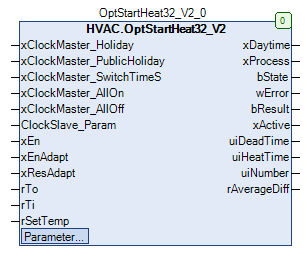
### Representation
### Interfaces
#### Inputs
| Name | Data type | Value range | Initial value | Function |
| ----------------------------- | -------------- | ----------- | ------------- | -------------------------------------------------------------------------------------------------------------------------------------------------------------------------------------------------------------- |
| *xClockMaster\_Holiday* | BOOL | | FALSE | Current state of the 'Holiday' channel of the instance of the associated FB 'ClockMaster32' (FALSE = no holiday) |
| *xClockMaster\_PublicHoliday* | BOOL | | FALSE | Current state of the 'PublicHoliday' channel of the instance of the associated FB 'ClockMaster32' (FALSE = no public holiday) |
| *xClockMaster\_SwitchTimeS* | BOOL | | FALSE | Current state of the 'SwitchTimeS' channel of the instance of the associated FB 'ClockMaster32' (FALSE = no special switching time) |
| *xClockMaster\_AllOn* | BOOL | | FALSE | Current state of the forced-ON central command of all 'xClockActive' outputs of all associated FB 'ClockSlave32' of the instance of the associated FB 'ClockMaster32' (FALSE = no forced-ON central command) |
| *xClockMaster\_AllOff* | BOOL | | FALSE | Current state of the forced-OFF central command of all 'xClockActive' outputs of all associated FB 'ClockSlave32' of the instance of the associated FB 'ClockMaster32' (FALSE = no forced-OFF central command) |
| *ClockSlave\_Param* | stSlvClockData | | | Interface to some selected parameters of the FB 'ClockSlave32' |
| *xEn* | BOOL | | FALSE | General enable for the switch-on optimization |
| *xEnAdapt* | BOOL | | TRUE | Enable for data storage in the historical memory |
| *xResAdapt* | BOOL | | TRUE | Reset of the historical memory |
| *rTo* | REAL | | | Current outside temperature |
| *rTi* | REAL | | | Current room temperature |
| *rSetTemp* | REAL | | | Current room setpoint temperature in comfort/daytime operation |
#### Outputs
| Name | Data type | Value range | Initial value | Function |
| -------------- | --------- | ----------- | ------------- | ------------------------------------------------------------------------------------------------------------------------------- |
| *xDaytime* | BOOL | | FALSE | Enable of comfort/daytime operation (Off = FALSE, On = TRUE) |
| *xProcess* | BOOL | | FALSE | Enable - preheating process (Off = FALSE, On = TRUE) |
| *bState* | BYTE | | 0 | Phase of the preheating process (0 = Off/Deactivated, 1 = Check time, 2 = Dead time, 3 = Heating time, 4 = End of heating time) |
| *wError* | WORD | | 0 | Error status of the last preheating process |
| *bResult* | BYTE | | 0 | Quality of the last preheating process (0 = invalid, 1 = good, 2 = normal, 3 = poor) |
| *xActive* | BOOL | | FALSE | State of the clock channel (Off = FALSE, On = TRUE) |
| *uiDeadTime* | UINT | | 0 | Display of the current dead time duration (min) |
| *uiHeatTime* | UINT | | 0 | Display of the current heating time duration (min) |
| *uiNumber* | UINT | | 0 | Display of the total number of successful preheating processes |
| *rAverageDiff* | REAL | | 0.0 | Average absolute room temperature deviation of the last 10 successful preheating processes |
#### Setpoints / parameters
| Name | Data type | Value range | Initial value | Function |
| ----------- | --------- | ----------- | ------------- | ---------------------------------------- |
| **uiHGMin** | UINT | | 30 | Minimum value - heating gradient (min/K) |
| **uiHGMax** | UINT | | 240 | Maximum value - heating gradient (min/K) |
| **uiDTMin** | UINT | | 10 | Minimum value - dead time (min) |
| **uiDTMax** | UINT | | 180 | Maximum value - dead time (min) |
| **uiHTMin** | UINT | | 15 | Minimum value - heating time (min) |
| **uiHTMax** | UINT | | 600 | Maximum value - heating time (min) |
#### Global variables
| Name | Data type | Value range | Initial value | Function |
| ---------------------------------- | --------- | ----------- | ------------- | -------------------------------------------------------------------------------------- |
| `gc_Parameters.rTOMin` | REAL | | -25 | Minimum value - outside temperature (°C) |
| `gc_Parameters.rTOMax` | REAL | | 25 | Maximum value - outside temperature (°C) |
| `gc_Parameters.rTIMin` | REAL | | 15 | Minimum value - room temperature (°C) |
| `gc_Parameters.rTIMax` | REAL | | 30 | Maximum value - room temperature (°C) |
| `gc_Parameters.rDiffSetTemp` | REAL | | 0 | Deviation from the room setpoint temperature at the end of the preheating process (K) |
| `gc_Parameters.rDTDiffTemp` | REAL | | 0.2 | Increase of the room temperature to detect the end of the dead time (K) |
| `gc_Parameters.uiPHMaxTime` | UINT | | 720 | Maximum duration of the preheating process |
| `gc_Parameters.rLimitResultWell` | REAL | | 0.5 | Result display: room temperature deviation - threshold for a good preheating process |
| `gc_Parameters.rLimitResultNormal` | REAL | | 1 | Result display: room temperature deviation - threshold for a normal preheating process |
### Constraints / boundary conditions
\
1\) This FB does not allow preheating processes that span multiple days. Therefore, the preheating process can begin at the earliest at 00:01 on any weekday.
{% hint style="info" %}
Example: Start - comfort operation: Monday - 05:30 // Calculated preheating time = 7 hours\
Optimal start time - preheating process: Sunday - 22:30\
Actual start time - preheating process: Monday - 00:01
{% endhint %}
2\) Special switching times, if assigned (FB 'ClockSlave32': parameter 'xSwitchTimeS' = TRUE) and active (FB 'ClockMaster32': output 'xSwitchTimeS' = TRUE), prevent the start of a preheating process and immediately abort any possibly active preheating process.
\
3\) The value of the output 'ctClockSlave32' of the FB 'ClockMaster32' is incremented by one by each instance of the FB 'OptStartHeat32'.
### Function description
\
The output **xDaytime** when switch-on optimization is generally enabled (xEn = TRUE) is activated before the planned start of comfort/daytime operation depending on historical data, the current outside temperature, the current room temperature and the current setpoint temperature for daytime/comfort operation **before** the planned start of comfort/daytime operation.\
\
This preheating ensures that the room temperature already matches the desired setpoint at the start of daytime operation.\
The required preheating time is recalculated for each preheating process **individually** and the actual preheating time additionally flows into the historical data.\
Preheating processes spanning multiple days are not possible.\
The switch-on optimization serves energy savings and increased user comfort.\
The components relevant to the switch-on optimization are processed every 60 s.\
\
A new preheating process will not be started or an active preheating process will be interrupted if at least one of the following\
conditions described below is met:\
\
1\) Holiday channel active (FB 'ClockMaster32' - xHoliday = TRUE AND FB 'ClockSlave32' - ClockSlaveParam.xHoliday = TRUE)\
2\) Public holiday channel active (FB 'ClockMaster32' - xPublicHoliday = TRUE AND FB 'ClockSlave32' - ClockSlaveParam.xPublicHoliday = TRUE)\
3\) Special switching times channel active (FB 'ClockMaster32' - xSwitchTimeS = TRUE AND FB 'ClockSlave32' - ClockSlaveParam.xSwitchTimeS = TRUE)\
4\) Central ON command active (FB 'ClockMaster32' - xAllOn = TRUE)\
5\) Central OFF command active (FB 'ClockMaster32' - xAllOff = TRUE)\
\
The preheating process is divided into four time segments.\
They are executed sequentially in each successful preheating process.\
The preheating process can end before, exactly at, or after the switching point (= transition to comfort/daytime operation).
#### Check time (bState = 1)
The check time serves for cyclical checking (every 60 s) whether the conditions for enabling preheating are met.\
\
It begins if the following conditions are met simultaneously:
1. The preheating process is not active (*xProcess* = FALSE)
2. The clock channel is not active (**xActive** = FALSE)
3. There exists a valid next switching point
\
It ends properly if the conditions for enabling preheating are met (= start of dead time).\
It ends in any case if the next valid switching point equals the current time.
#### Dead time (bState = 2)
The dead time serves for preconditioning the heating.\
\
It begins with the proper end of the check time.\
\
It ends properly if the current room temperature *rTi* exceeds the room temperature at the start of dead time by the adjustable difference `gc_Parameters.rDTDiffTemp` persistently for at least 120 s (= start of heating time).\
\
It ends in any case if the next valid switching point equals the current time.
#### Heating time (bState = 3)
The heating time serves to preheat the zone.\
\
It begins with the proper end of the dead time.\
\
It ends properly if the current room temperature *rTI* the current room setpoint temperature in comfort/daytime operation *rSetTemp* approaches within a duration of at least 120 s to a difference smaller than the global variable `gc_Parameters.rDiffSetTemp` approaches.\
\
It ends if a falling edge is detected on the state of the clock channel *xActive* is detected.\
\
It ends if the current heating time duration exceeds the adjustable maximum value **uiHTMax** .
#### End of heating time (bState = 4)
The end of heating time serves to conclude the successful preheating process. The historical data are updated, provided no limits are violated, if data storage in the historical memory (*xEnAdapt*) is active.\
\
It begins with the proper end of the heating time.
#### Enable *xEn*
This input serves as the general enable for the switch-on optimization (*xEn* = TRUE). In the locked state (*xEn* = FALSE) the outputs are defined as follows:
| Output | State/Value | Notes |
| -------------- | ----------- | ----- |
| *xDaytime* | FALSE | |
| *xProcess* | FALSE | |
| *bState* | 0 | |
| *wError* | 0 | |
| *bResult* | 0 | |
| *uiDeadTime* | 0 | |
| *uiHeatTime* | 0 | |
| *uiNumber* | 0 | |
| *rAverageDiff* | 0 | |
The historical data remain preserved even in the locked state.\
\
This input can also be used to map sensor faults (fault - room temperature sensor, fault - outside temperature sensor) or for operating the zone in extended occupancy mode.
#### Enable *xEnAdapt*
This input serves to enable data storage in the historical memory (*xEnAdapt* = TRUE, prerequisite: *xEn* = TRUE).\
After each successful preheating process the relevant parameters are stored and thus available for the next preheating process.\
In the locked state (*xEnAdapt* = FALSE) no data storage takes place.
#### Enable *xResAdapt*
This input serves to initialize the historical memory on each rising signal edge (prerequisite: *xEn* = TRUE).
| Memory | State/Value | Notes |
| ------------------------------ | ----------- | ----- |
| Heating gradients | **uiHGMax** | |
| Dead times | **uiDTMax** | |
| Number of preheating processes | 0 | |
Additionally, the buffer for the average absolute room temperature deviation of the last 10 successful preheating processes and the data memory for the current data are reset.
{% hint style="info" %}
**Meaningful use of the input *****xResAdapt***
This input can be used in combination with the output *rAverageDiff* (Average absolute room temperature deviation of the last 10 successful preheating processes) to trigger a reinitialization of the historical and current data in case of larger deviations.
{% endhint %}
#### Input *rTo*
This input is used to capture the current outside temperature.\
It is additionally time-filtered and limited for the switch-on optimization (minimum value = `gc_Parameters.rTOMin`, maximum value = `gc_Parameters.rTOMax`).
#### Input *rTi*
This input is used to capture the current room temperature.\
It is additionally time-filtered and limited for the switch-on optimization (minimum value = `gc_Parameters.rTIMin`, maximum value = `gc_Parameters.rTIMax`).
#### Input *rSetTemp*
This input is used to capture the current room setpoint temperature for comfort/daytime operation.\
On every change of the setpoint temperature a reset to the default state occurs (see Enable - locked state). *xEn* This output serves to enable comfort/daytime operation (Off = FALSE, On = TRUE)
#### Output *xDaytime*
by the switch-on optimization **.**\
**It is activated upon transition from the check time to the dead time.**\
**It is deactivated if the next valid switching point is reached.**This output serves to indicate an active preheating process (Off = FALSE, On = TRUE).\
It is active if the preheating process is in phases 1 - 4 and/or the output
#### Output *xProcess*
is active. *xDaytime* This output serves to indicate the active phase of the preheating process.
#### Output *bState*
Phase
| Value | Off / Deactivated |
| ----- | ----------------------------------------------------------------------------------------------------------------------------------------------------------------------------------------------------------------------------------------------------------------------------------------------------------------------------------------------------------------------------------------------------------------------------------------------------------------------------------------------------------------------------------------------------- |
| 0 | Check time active |
| 1 | Dead time active |
| 2 | Heating time active |
| 3 | End of heating time active |
| 4 |
This output serves to indicate warnings / errors during the last preheating process. Each message is assigned a bit (Bit = 0 = no error, Bit = 1 = warning / error active). This output is updated continuously. On every change the date / current time is also recorded. This output is always initialized to 0 (= no error) at the start of the check time. On every occurrence of an error the preheating process is stopped and the phase 'Off / Deactivated' is initiated. On every occurrence of a warning the output
|
#### Output *wError*
is updated. *wError* Bit
| Cause | Error type | Exceeding the maximum heating time | Notes |
| ----- | ---------------------------------------------------------------------------------------------------------------------------------------------------------------------------------------------------------------------------------------------------- | ---------------------------------- | ----- |
| 1 | Error | Limit violation heating gradient | |
| 4 | Warning | Limit violation dead time | |
| 5 | Undershooting the minimum heating time | Limit violation dead time | |
| 6 |
This output serves to indicate the quality of the last successful preheating process. The output is updated at the switching point (= transition to comfort/daytime operation) if necessary. The absolute value from the calculation of
| Limit violation dead time | |
#### Output *bResult*
is used for the assessment.\
This output is always initialized to 0 (= no result) at the start of the check time. *rSetTemp* - `gc_Parameters.rDiffSetTemp` - *rTi* Result
| Threshold | less than | *bResult* | Notes |
| ----------------------- | ---------------------------------- | --------- | ---------------------------------------------------------------------------------------------------------------------------------------------------------------------------------------- |
| Good preheating process | `gc_Parameters.rLimitResultWell` | 1 | Normal preheating process |
| Good preheating process | `gc_Parameters.rLimitResultNormal` | 2 | greater or equal |
| Poor preheating process | `gc_Parameters.rLimitResultNormal` | 3 |
This output serves to indicate the state of the output 'xClockActive' of the FB 'ClockSlave32' (Off = FALSE, On = TRUE). It is updated continuously regardless of the state of
|
#### Output *xActive*
(= General enable of the switch-on optimization). *xEn* This output serves to display the current dead time duration (min).\
This output is always initialized to 0 min at the start of the check time.
#### Output *uiDeadTime*
This output serves to display the current heating time duration (min).\
This output is always initialized to 0 min at the start of the check time.
#### Output *uiHeatTime*
This output serves to display the total number of successful preheating processes.
#### Output *uiNumber*
This output serves to display the average absolute room temperature deviation of the last 10 successful preheating processes.\
This output is always updated after the update of the output
#### Output *rAverageDiff*
is updated.\
This output is initialized to 0 K on every rising signal edge at the input *bResult* with 0 K. *xResAdapt* Meaningful use of the output
{% hint style="info" %}
**This output can be used in combination with the input *****rAverageDiff***
(Reset of the historical memory) to trigger a reinitialization of the historical and current data in case of larger deviations. *xResAdapt* 1. Preheating process
{% endhint %}
#### After the software download or after each rising signal edge at the input
the historical data are reinitialized.\
The dead times are described by the parameter *xResAdapt* , the heating gradients by the parameter **uiDTMax**and the number of successful preheating processes with the value 0. **uiHGMax** Parameter
#### This parameter serves to define the minimum allowable heating gradient (min / K). It is used to check for limit violations. In case of a limit violation the historical data are not updated. **uiHGMin**
This parameter serves to define the maximum allowable heating gradient (min / K).\
It is used to check for limit violations. In case of a limit violation the historical data are not updated.
#### This parameter serves to define the minimum allowable heating gradient (min / K). It is used to check for limit violations. In case of a limit violation the historical data are not updated. **uiHGMax**
This parameter serves to define the minimum allowable dead time (min).\
It is used to check for limit violations. In case of a limit violation the historical data are not updated.
#### This parameter serves to define the minimum allowable heating gradient (min / K). It is used to check for limit violations. In case of a limit violation the historical data are not updated. **uiDTMin**
This parameter serves to define the maximum allowable dead time (min).\
It is used to check for limit violations. In case of a limit violation the historical data are not updated.
#### This parameter serves to define the minimum allowable heating gradient (min / K). It is used to check for limit violations. In case of a limit violation the historical data are not updated. **uiDTMax**
This parameter serves to define the minimum allowable heating time (min).\
It is used to check for limit violations.
#### This parameter serves to define the minimum allowable heating gradient (min / K). It is used to check for limit violations. In case of a limit violation the historical data are not updated. **uiHTMin**
This parameter serves to define the maximum allowable heating time (min).\
It is used to check for limit violations.\
On every occurrence of a limit violation the preheating process is stopped and the phase 'Off / Deactivated' is initiated.
#### This parameter serves to define the minimum allowable heating gradient (min / K). It is used to check for limit violations. In case of a limit violation the historical data are not updated. **uiHTMax**
Global variable
#### This global variable serves to define the minimum allowable outside temperature (°C). It is used to check and correct limit violations. `gc_Parameters.rTOMin`
This global variable serves to define the maximum allowable outside temperature (°C).\
It is used to check and correct limit violations.
#### This global variable serves to define the minimum allowable outside temperature (°C). It is used to check and correct limit violations. `gc_Parameters.rTOMax`
This global variable serves to define the minimum allowable room temperature (°C).\
It is used to check and correct limit violations.
#### This global variable serves to define the minimum allowable outside temperature (°C). It is used to check and correct limit violations. `gc_Parameters.rTIMin`
This global variable serves to define the maximum allowable room temperature (°C).\
It is used to check and correct limit violations.
#### This global variable serves to define the minimum allowable outside temperature (°C). It is used to check and correct limit violations. `gc_Parameters.rTIMax`
This global variable serves to define the deviation from the room setpoint temperature at the end of the preheating process (K).\
It defines how close the room temperature must approach the setpoint temperature in daytime/comfort operation to terminate the active preheating process.
#### This global variable serves to define the minimum allowable outside temperature (°C). It is used to check and correct limit violations. `gc_Parameters.rDiffSetTemp`
This global variable serves to define the increase of the room temperature to detect the end of the dead time (K).\
It defines how much the room temperature must increase persistently during dead time to initiate the heating time.
#### This global variable serves to define the minimum allowable outside temperature (°C). It is used to check and correct limit violations. `gc_Parameters.rDTDiffTemp`
This global variable serves to define the maximum duration of the preheating process.\
It is used for internal calculations.
#### This global variable serves to define the minimum allowable outside temperature (°C). It is used to check and correct limit violations. `gc_Parameters.uiPHMaxTime`
This global variable serves to define the threshold 'Good preheating process' for the quality display
#### This global variable serves to define the minimum allowable outside temperature (°C). It is used to check and correct limit violations. `gc_Parameters.rLimitResultWell`
This global variable serves to define the threshold 'Normal preheating process' for the quality display *bResult*.
#### This global variable serves to define the minimum allowable outside temperature (°C). It is used to check and correct limit violations. `gc_Parameters.rLimitResultNormal`
Typical application *bResult*.
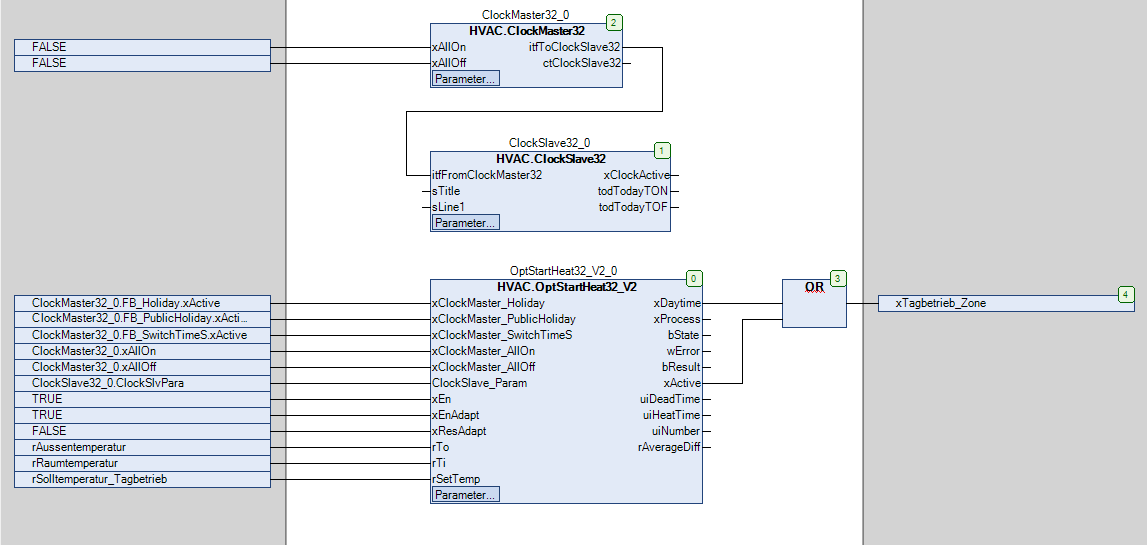
#### This function block can be applied as follows:
This function block can be applied as follows:
### CODESYS
InOut:
| Scope | Name | Type | Initial |
| ----------- | ---------------------------- | -------------- | ------- |
| Input | `xClockMaster_Holiday` | `BOOL` | FALSE |
| Input | `xClockMaster_PublicHoliday` | `BOOL` | FALSE |
| Input | `xClockMaster_SwitchTimeS` | `BOOL` | FALSE |
| Input | `xClockMaster_AllOn` | `BOOL` | FALSE |
| Input | `xClockMaster_AllOff` | `BOOL` | FALSE |
| Input | `ClockSlave_Param` | stSlvClockData | |
| Input | `xEn` | `BOOL` | FALSE |
| Input | `xEnAdapt` | `BOOL` | TRUE |
| Input | `xResAdapt` | `BOOL` | FALSE |
| Input | `rTo` | `REAL` | |
| Input | `rTi` | `REAL` | |
| Input | `rSetTemp` | `REAL` | |
| Output | `xDaytime` | `BOOL` | FALSE |
| Output | `xProcess` | `BOOL` | FALSE |
| Output | `bState` | `BYTE` | 0 |
| Output | `wError` | `WORD` | 0 |
| Output | `bResult` | `BYTE` | 0 |
| Output | `xActive` | `BOOL` | FALSE |
| Output | `uiDeadTime` | `UINT` | 0 |
| Output | `uiHeatTime` | `UINT` | 0 |
| Output | `uiNumber` | `UINT` | 0 |
| Output | `rAverageDiff` | `REAL` | 0.0 |
| Input Const | `uiHGMin` | `UINT` | 30 |
| Input Const | `uiHGMax` | `UINT` | 240 |
| Input Const | `uiDTMin` | `UINT` | 10 |
| Input Const | `uiDTMax` | `UINT` | 180 |
| Input Const | `uiHTMin` | `UINT` | 15 |
| Input Const | `uiHTMax` | `UINT` | 600 |
---
# Agent Instructions
This documentation is published with GitBook. GitBook is the documentation platform designed so that both humans and AI agents can read, navigate, and reason over technical content effectively. Learn more at gitbook.com.
## Querying This Documentation
If you need additional information that is not directly available in this page, you can query the documentation dynamically by asking a question.
Perform an HTTP GET request on the current page URL with the `ask` query parameter, and the optional `goal` query parameter:
```
GET https://support.powerio.com/hub/codesys-hvac/en/hvac-library/functionblocks/optimizer/optstartheat32_v2.md?ask=&goal=
```
`ask` is the immediate question: it should be specific, self-contained, and written in natural language.
`goal` is optional and describes the broader end goal you are ultimately trying to accomplish on behalf of the user. GitBook uses it to tailor the answer towards what is most useful for that goal.
The response will contain a direct answer to the question and relevant excerpts and sources from the documentation.
Use this mechanism when the answer is not explicitly present in the current page, you need clarification or additional context, or you want to retrieve related documentation sections.
.png?alt=media)