> For the complete documentation index, see [llms.txt](https://support.powerio.com/hub/llms.txt). Markdown versions of documentation pages are available by appending `.md` to page URLs; this page is available as [Markdown](https://support.powerio.com/hub/codesys-hvac/en/hvac-library/functionblocks/numeric/absa.md).
# AbsA
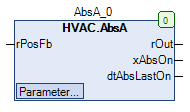
## `AbsA` (FB)
FUNCTION\_BLOCK AbsA
### Short description
> Anti-blocking protection for an analog signal
### Representation
### Interfaces
#### Inputs
| Name | Data type | Value range | Initial value | Function |
| -------- | --------- | ----------- | ------------- | ----------------- |
| *rPosFb* | REAL | | | Position feedback |
#### Outputs
| Name | Data type | Value range | Initial value | Function |
| ------------- | --------------- | ----------- | ------------- | ------------------------------------------------- |
| *rOut* | REAL | | | Analog - output |
| *xAbsOn* | BOOL | | | Indicator - anti-blocking process |
| *dtAbsLastOn* | DATE\_AND\_TIME | | | Start date/time of the last anti-blocking process |
#### Setpoints / parameters
| Name | Data type | Value range | Initial value | Function |
| ---------------- | --------- | ----------- | ------------- | ---------------------------------------- |
| **rMinChange** | REAL | | 10.0 | Minimum position change |
| **tTime** | TIME | | 180s | Duration of the anti-blocking process |
| **eDay** | eDoW | | eDow\.Monday | Weekday of the anti-blocking process |
| **todStartTime** | TOD | | 08:00:00 | Start time of the anti-blocking process |
| **rMinLimit** | REAL | | 0 | Lower limit for the analog output *rOut* |
| **rMaxLimit** | REAL | | 100 | Upper limit for the analog output *rOut* |
### Function description
#### General
This function block is used to monitor the position feedback *rPosFb* for activity. The inspection period covers 168 hours each (= 1 week).\
The position feedback *rPosFb* is considered active if its value has changed by an amount greater than the minimum position change during the inspection period. **rMinChange** The anti-blocking process is thus prevented (= anti-blocking process not active), and the inspection period starts again.\
\
If no activity was detected during the inspection period, the anti-blocking process is triggered with the duration **tTime** on the weekday **eDay** at the time **todStartTime** initiated. (= anti-blocking process active).\
At the same time the inspection period restarts.\
\
During the anti-blocking process, at the analog output *rOut* different signals are output depending on the current value of the position feedback *rPosFb* at the start of the anti-blocking process.\
\
Condition 1: *rPosFb* > 51% of the upper limit for the analog output *rOut*:\
\
*rOut* = **rMinLimit**\
\
Condition 2: *rPosFb* <= 51% of the upper limit for the analog output *rOut*:\
\
*rOut* = **rMaxLimit**\
\
When the anti-blocking process is not active, the value 0.0 is output at the analog output. *rOut* The initial triggering of the anti-blocking process may be delayed depending on the relevant settings (weekday **eDay** and **todStartTime**) (example: inspection period ended on Tuesday morning, anti-blocking process triggered only the following Monday).\
\
At the output *dtAbsLastOn* the start date and start time of the last anti-blocking process are available.
{% hint style="info" %}
**Prerequisite for using the AbsA function block**
The use of the TimeRead2 function block is required for correct operation.
{% endhint %}
#### Indicator - anti-blocking process *xAbsOn*
This output is used to indicate an active anti-blocking process (*xAbsOn* = TRUE).
#### Setpoint / parameters **eDay**
The anti-blocking function can be globally disabled by setting **eDay** = eDow\.Inactive.
#### Setpoint / parameters **tTime**
The anti-blocking function can be globally disabled by setting **tTime** = 0s can be globally disabled.
### CODESYS
InOut:
| Scope | Name | Type | Initial |
| ----------- | -------------- | ------ | ----------------- |
| Input | `rPosFb` | `REAL` | |
| Input Const | `rMinChange` | `REAL` | 10 |
| Input Const | `tTime` | `TIME` | TIME#3m0s0ms |
| Input Const | `eDay` | eDoW | eDow\.Monday |
| Input Const | `todStartTime` | `TOD` | TIME\_OF\_DAY#8:0 |
| Input Const | `rMinLimit` | `REAL` | 0 |
| Input Const | `rMaxLimit` | `REAL` | 100 |
| Output | `rOut` | `REAL` | |
| Output | `xAbsOn` | `BOOL` | |
| Output | `dtAbsLastOn` | `DT` | |
---
# Agent Instructions
This documentation is published with GitBook. GitBook is the documentation platform designed so that both humans and AI agents can read, navigate, and reason over technical content effectively. Learn more at gitbook.com.
## Querying This Documentation
If you need additional information that is not directly available in this page, you can query the documentation dynamically by asking a question.
Perform an HTTP GET request on the current page URL with the `ask` query parameter, and the optional `goal` query parameter:
```
GET https://support.powerio.com/hub/codesys-hvac/en/hvac-library/functionblocks/numeric/absa.md?ask=&goal=
```
`ask` is the immediate question: it should be specific, self-contained, and written in natural language.
`goal` is optional and describes the broader end goal you are ultimately trying to accomplish on behalf of the user. GitBook uses it to tailor the answer towards what is most useful for that goal.
The response will contain a direct answer to the question and relevant excerpts and sources from the documentation.
Use this mechanism when the answer is not explicitly present in the current page, you need clarification or additional context, or you want to retrieve related documentation sections.