> For the complete documentation index, see [llms.txt](https://support.powerio.com/hub/llms.txt). Markdown versions of documentation pages are available by appending `.md` to page URLs; this page is available as [Markdown](https://support.powerio.com/hub/codesys-hvac/en/hvac-library/functionblocks/counter/operatinghours.md).
# OperatingHours
## `OperatingHours` (FB)
FUNCTION\_BLOCK OperatingHours
### Short description
> Counter for operating hours and switch-on events
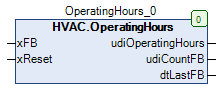
### Representation
### Interfaces
#### Inputs
| Name | Data type | Value range | Initial value | Function |
| -------- | --------- | ----------- | ------------- | ---------------------- |
| *xFb* | BOOL | | | Counter - Input |
| *xReset* | BOOL | | FALSE | Enable - Input - Reset |
#### Outputs
| Name | Data type | Value range | Initial value | Function |
| ------------------- | --------------- | ----------- | ------------- | ------------------------------------------------- |
| *udiOperatingHours* | UDINT | | | Counter - Output - Operating hours |
| *udiCountFb* | UDINT | | | Counter - Output - Switch-ons |
| *dtLastFb* | DATE\_AND\_TIME | | | Date/time of the end of the last counting process |
### Functional description
#### General
This function block is used to record operating hours and switch-on events at the counter input *xFb*.\
The outputs *udiOperatingHours* and *udiCountFb* are reset to 0 as soon as at the input *xReset* a rising edge is detected.\
The counting process is active as long as at the counter input *xFb* the state TRUE is present.\
The output *udiOperatingHours* shows the cumulative duration of the counting processes since the last reset in hours.\
The output *udiCountFb* is incremented with every rising edge at the input *xFb* incremented.\
\
At the output *dtLastFb* the current date / current time is available during the counting process.\
At output *dtLastFb* the date / time at the end of the last counting process is available outside the counting process.\
At output *dtLastFb* the initialization value DT#1970-1-1-0.0.0 is output before the first counting process.
> **Value ranges of the outputs *****udiOperatingHours***** and *****udiCountFb***
>
> Valid counter values are within the limits 0 and 4294967295.\
> Incrementing the counter value 4294967295 resets the counter value to 0.\
> Afterwards, the counter value is incremented continuously again.
>
> **Requirement for the use of the function block OperatingHours**
>
> For correct operation, the use of the TimeRead2 function block is required.
>
> **Write access to the counter values**
>
> Via the path ‘InstanceName.\_OperatingHours.udiOperatingHours’ or ‘InstanceName.\_OperatingHours.udiCountFb’, write access to both counter values is possible.
### CODESYS
InOut:
| Scope | Name | Type | Initial |
| ------ | ------------------- | ------- | ------- |
| Input | `xFb` | `BOOL` | |
| Input | `xReset` | `BOOL` | FALSE |
| Output | `udiOperatingHours` | `UDINT` | |
| Output | `udiCountFb` | `UDINT` | |
| Output | `dtLastFb` | `DT` | |
Methods:
> mReset
Structure:
* mReset (Method)
---
# Agent Instructions
This documentation is published with GitBook. GitBook is the documentation platform designed so that both humans and AI agents can read, navigate, and reason over technical content effectively. Learn more at gitbook.com.
## Querying This Documentation
If you need additional information that is not directly available in this page, you can query the documentation by asking a question.
Perform an HTTP GET request on the following URL with the `ask` and `goal` query parameters:
```
GET https://support.powerio.com/hub/codesys-hvac/en/hvac-library/functionblocks/counter/operatinghours.md?ask=&goal=
```
`ask` is the immediate question: it should be specific, self-contained, and written in natural language.
`goal` is what the user is ultimately trying to achieve, the reason they need the answer. Sharing it helps GitBook give you a better, more relevant answer. A goal is most helpful when it describes the outcome the user wants rather than restating the question. For example, with `ask=how do I create an API token`, a goal like `automate deployments from our CI pipeline` lets GitBook tailor the answer to that use case.
The response will contain a direct answer to the question and relevant excerpts and sources from the documentation.
Use this mechanism when the answer is not explicitly present in the current page, you need clarification or additional context, or you want to retrieve related documentation sections.