> For the complete documentation index, see [llms.txt](https://support.powerio.com/hub/llms.txt). Markdown versions of documentation pages are available by appending `.md` to page URLs; this page is available as [Markdown](https://support.powerio.com/hub/powerio-r-system/en/powerio-r-tools/overview.md).
# powerIO v2 App
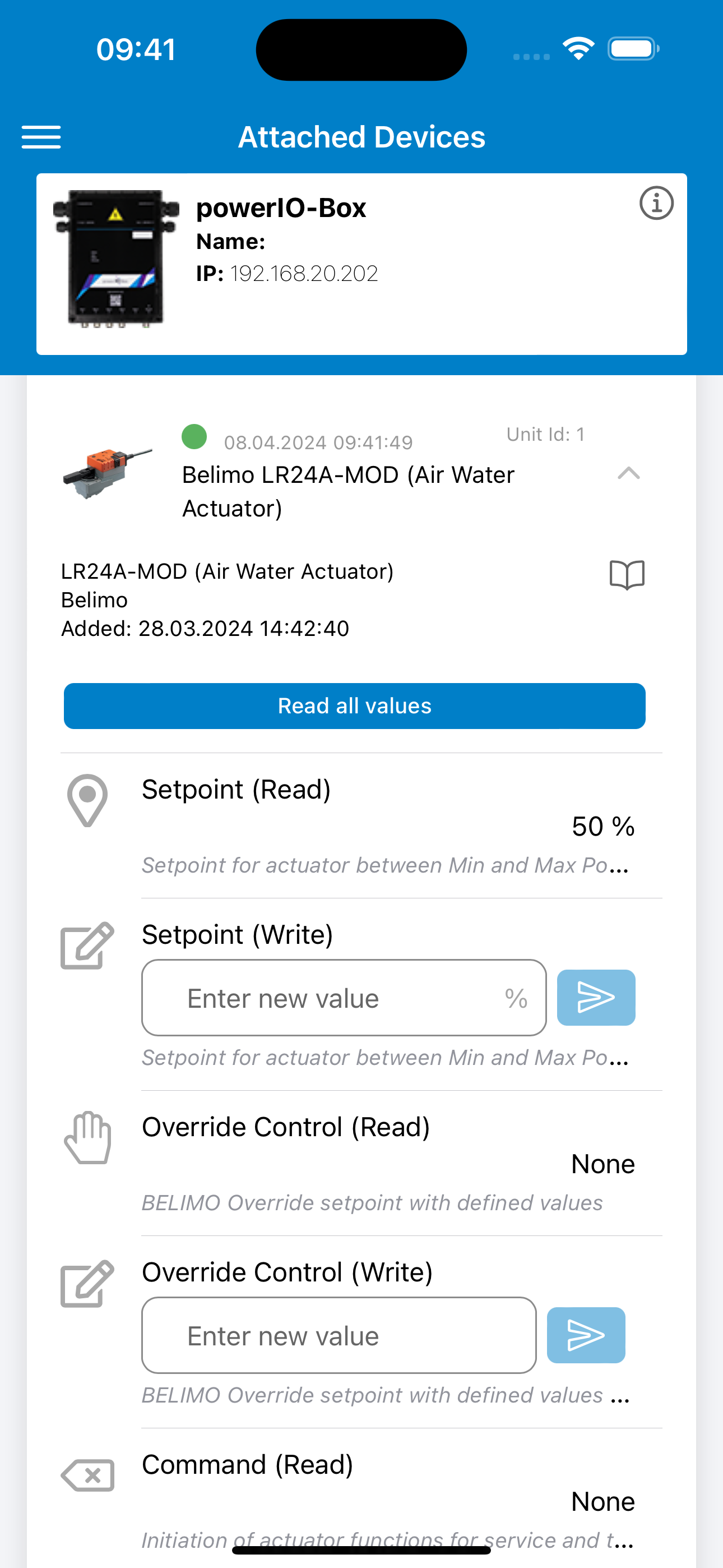
The powerIO v2 Application enables you to commission your sensors and actuators with ease. You can also use it to configure the powerIO T1.B100 device.
{% hint style="info" %}
[To the application’s download area for Mobile, Web and Desktop](/hub/downloads/en/powerio-r-tools/powerio-v2-app.md)
{% endhint %}
### Features
* Easy setup of communicative fieldbus devices.
* Adjustment of parameters such as baud rate and network settings.
* Thanks to an extensive library of predefined Modbus devices, selectable from a database, the tedious search through data sheets to identify specific Modbus registers is no longer necessary.
* Advanced mode for querying Modbus registers that are not predefined as a device.
* Set up once and keep an eye on the data at all times. Even when you are not on site, you can view or edit the added Modbus devices at any time via the Web Application or Desktop Application.
* Connection via WiFi dongle or through an existing network.
### Preview
### Information about the powerIO v2 App
With the new powerIO v2 App, you have the opportunity to make even better use of the T1.B100 device. One of the main reasons for the new application is that you are no longer limited to viewing, testing, and configuring the configured fieldbus devices on site. You can now also do this easily via your web browser or the desktop application.
#### **From practice - use cases**
**Commissioning:**
With the powerIO v2 App, every service technician becomes an expert in fast commissioning. Imagine your technician arrives, connects all components such as damper actuators and temperature sensors, and everything is immediately ready for use - completely without programming effort and without the cumbersome paging through manuals to find data sheets for Modbus queries.
The powerIO v2 App makes it possible: the technician commissions the fieldbus device, selects the connected device from the app, and can test it directly and easily. This optimizes efficiency and saves valuable time and resources. Experience how the powerIO v2 App revolutionizes your commissioning processes!
*See for yourself how easy it is to commission a device:*
**Manual override:**
By connecting your digital input and output modules via fieldbus protocol, we now offer you the option to react quickly in the event of a controller failure or a temporary malfunction. Whether on site by facility managers using our mobile app or remotely via the web or desktop app, you can perform a manual override at any time to maintain the operation of your system.
This function not only ensures the continuity of your operating processes, but also the efficiency and safety of your facilities. Use the flexibility of our apps to intervene in control at any time and from anywhere and ensure the operation of your system.
**Maintenance and service:**
Optimize the inspection process of your systems with our user-friendly solution: added devices can be tested for functionality at any time. Simplify the process by being able to view a test result immediately for each connected fieldbus device - without navigating through complex control programs. This direct and easy access to test results significantly speeds up maintenance and commissioning processes and increases the efficiency of your operating procedures.
#### FAQ - powerIO v2 App
How can I connect to the powerIO - T1.B100 device?
You have two ways to connect to the powerIO - T1.B100 device.\
\
**Connection in the same network:**\
\
To do this, select the option - "Connect to device in your network" and enter the device’s IP address.\ 
\
**Connection with WiFi dongle:**
You can also connect directly to the device on site. For this, a WiFi dongle is required. You can purchase the WiFi dongle separately from us in the [Shop](https://shop.powerio.com) or contact us personally.\
\
Please note that the WiFi dongle does not *require* an existing network. This allows you to connect directly to the device locally. Simply select the option "Connect to device WiFi" and then go to "Settings" to connect to the WiFi hotspot.\
\ Can I use my T1.D100 - Bluetooth dongle with the powerIO v2 App?
***No***, one of the reasons for the application update was the use of Bluetooth as a transmission path. With the new WiFi dongle, we can now provide you with new functions faster and more easily. Since the technical implementation is based on the standard of the web interface, you benefit from accelerated development.
In addition, the security level increases, as authentication is now required and the login information matches the password you have chosen for the web interface.
Can I continue to use the old application?
You can only still use the previous powerIO application **to a limited extent** up to f**irmware version < 3.9**. Future app updates will no longer be provided. We therefore recommend updating to the new firmware so that you can use the powerIO v2 app.
---
# Agent Instructions
This documentation is published with GitBook. GitBook is the documentation platform designed so that both humans and AI agents can read, navigate, and reason over technical content effectively. Learn more at gitbook.com.
## Querying This Documentation
If you need additional information that is not directly available in this page, you can query the documentation dynamically by asking a question.
Perform an HTTP GET request on the current page URL with the `ask` query parameter, and the optional `goal` query parameter:
```
GET https://support.powerio.com/hub/powerio-r-system/en/powerio-r-tools/overview.md?ask=&goal=
```
`ask` is the immediate question: it should be specific, self-contained, and written in natural language.
`goal` is optional and describes the broader end goal you are ultimately trying to accomplish on behalf of the user. GitBook uses it to tailor the answer towards what is most useful for that goal.
The response will contain a direct answer to the question and relevant excerpts and sources from the documentation.
Use this mechanism when the answer is not explicitly present in the current page, you need clarification or additional context, or you want to retrieve related documentation sections.



 
\
**Connection with WiFi dongle:**
You can also connect directly to the device on site. For this, a WiFi dongle is required. You can purchase the WiFi dongle separately from us in the [Shop](https://shop.powerio.com) or contact us personally.\
\
Please note that the WiFi dongle does not *require* an existing network. This allows you to connect directly to the device locally. Simply select the option "Connect to device WiFi" and then go to "Settings" to connect to the WiFi hotspot.\
\

\
**Connection with WiFi dongle:**
You can also connect directly to the device on site. For this, a WiFi dongle is required. You can purchase the WiFi dongle separately from us in the [Shop](https://shop.powerio.com) or contact us personally.\
\
Please note that the WiFi dongle does not *require* an existing network. This allows you to connect directly to the device locally. Simply select the option "Connect to device WiFi" and then go to "Settings" to connect to the WiFi hotspot.\
\ 