> For the complete documentation index, see [llms.txt](https://support.powerio.com/hub/llms.txt). Markdown versions of documentation pages are available by appending `.md` to page URLs; this page is available as [Markdown](https://support.powerio.com/hub/codesys-hvac/en/hvac-bacnet2-library/funktionsbausteine/client-objekte/clientwriteproperty_manyinputs.md).
# ClientWriteProperty\_ManyInputs
## `ClientWriteProperty_ManyInputs` (FB)
FUNCTION\_BLOCK ClientWriteProperty\_ManyInputs
### Short description
> Updating properties of BACNET objects (write access)\
> \
> Typical application: changing a setpoint temperature via BACNET
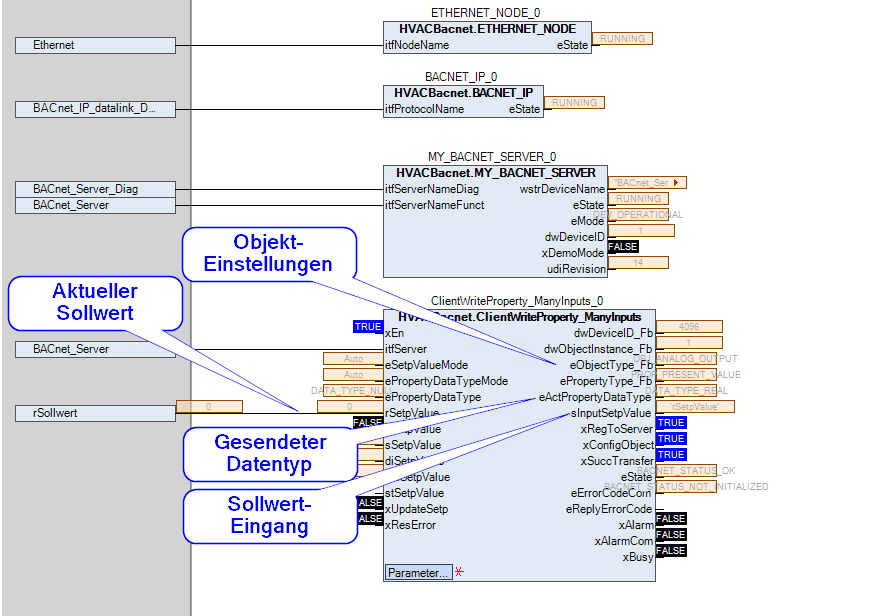
### Representation
### Interfaces
#### Inputs
| Name | Data type | Value range | Initial value | Function |
| ----------------------- | ------------------------------------------------ | ----------- | --------------------------------------------------------- | ------------------------------------------------------------------------------------------------------------------ |
| *xEn* | BOOL | | TRUE | Enable / disable communication ( TRUE = enable ) |
| ‘itfServer\* | BACnet.IBACnetServer | | | Interface variable for referencing the server |
| *eSetpValueMode* | ClientWriteProperty\_SetpValueMode | | ClientWriteProperty\_SetpValueMode.Auto | Selection of the operating mode for the setpoint input |
| *ePropertyDataTypeMode* | ClientWriteProperty\_PropertyDataTypeMode | | ClientWriteProperty\_PropertyDataTypeMode.Auto | Selection of the operating mode for the transmitted property data type |
| *ePropertyDataType* | BACnet.CmpBACnet.IEC\_BACNET\_DATA\_TYPE | | BACnet.CmpBACnet.IEC\_BACNET\_DATA\_TYPE.DATA\_TYPE\_NULL | Selection of the transmitted data type of the property in operating mode ePropertyDataTypeMode = ePropertyDataType |
| *rSetpValue* | REAL | | 0.0 | Setpoint of the property in REAL format (floating-point number according to IEEE754 - 32 bit) |
| *xSetpValue* | BOOL | | FALSE | Setpoint of the property in BOOL format |
| *sSetpValue* | STRING\[255] | | ‘’ | Setpoint of the property in STRING format (string) |
| *diSetpValue* | DINT | | 0 | Setpoint of the property in DINT format (32 bit, signed integer) |
| *udiSetpValue* | UDINT | | 0 | Setpoint of the property in UDINT format (32 bit, unsigned integer) |
| *stSetpValue* | BACnet.CmpBACnet.IEC\_BACNET\_PROPERTY\_CONTENTS | | | Setpoint of the property in IEC\_BACNET\_PROPERTY\_CONTENTS format (direct transfer to the interface) |
| *xUpdateSetp* | BOOL | | FALSE | Updating the setpoints (on every rising edge) |
| *xResError* | BOOL | | FALSE | Resetting the fault outputs ‘eErrorCodeCom’ and ‘eRepyErrorCode.XXX’ (on every rising edge) |
#### Outputs
| Name | Data type | Value range | Initial value | Function |
| --------------------------------------------------------------- | ------------------------------------------ | ----------- | ------------- | ------------------------------------------------------------------------------------------------------------------------------------------- |
| *dwDeviceID\_Fb* | DWORD | | 0 | Number of the BACnet target device (range: 0 - 4194302) - feedback |
| *dwObjectInstance\_Fb* | DWORD | | 0 | Number of the object (range: 0 - 4194303) - feedback |
| *eObjectType\_Fb* | BACnet.CmpBACnet.IEC\_BACnet\_Object\_Type | | | Type of the object - feedback |
| *ePropertyType\_Fb* | BACnet.CmpBACnet.IEC\_BACNET\_PROPERTY\_ID | | | Property type - feedback |
|
\
\*\
eActPropertyDataType’
| BACnet.CmpBACnet.IEC\_BACNET\_DATA\_TYPE | | | BACNET property data type, automatic determination based on ‘eObjectType’ and ‘ePropertyType’ (ePropertyDataTypeMode = Auto) |
|
\
\*\
sInputSetpValue’
| STRING | | ‘’ | Display of the input for the property setpoint |
|
\
\*\
xRegToServer’
| BOOL | | FALSE | Status of registration with the BACnet server ( TRUE = successful registration ) |
|
\
\*\
xConfigObject’
| BOOL | | FALSE | Status of object configuration ( TRUE = successful configuration ) |
|
\
\*\
xSuccTransfer’
| BOOL | | FALSE | Status of the successful update of the property's setpoint (TRUE = transmission successful, rising edge after each successful transmission) |
|
\
\*\
eState’
| BACnet.CmpBACnet.IEC\_BACNET\_STATUS | | | Status of communication |
|
\
\*\
eErrorCodeCom’
| BACnet.CmpBACnet.IEC\_BACNET\_STATUS | | | Most recent communication error |
|
\
\*\
eReplyErrorCode’
| TYPE\_OF\_REPLY\_ERROR\_CODE | | | Most recent communication error in the response to a request of its own |
|
| BOOL | | FALSE | Collective fault - communication ( TRUE = fault ) |
| *xBusy* | BOOL | | | Communication display ( TRUE = communication ) |
#### Setpoints / Parameters
| Name | Data type | Value range | Initial value | Function |
| -------------------- | ------------------------------------------ | ----------- | ----------------------------------------------------------------- | ------------------------------------------------------------------------------------------------------------------------------------ |
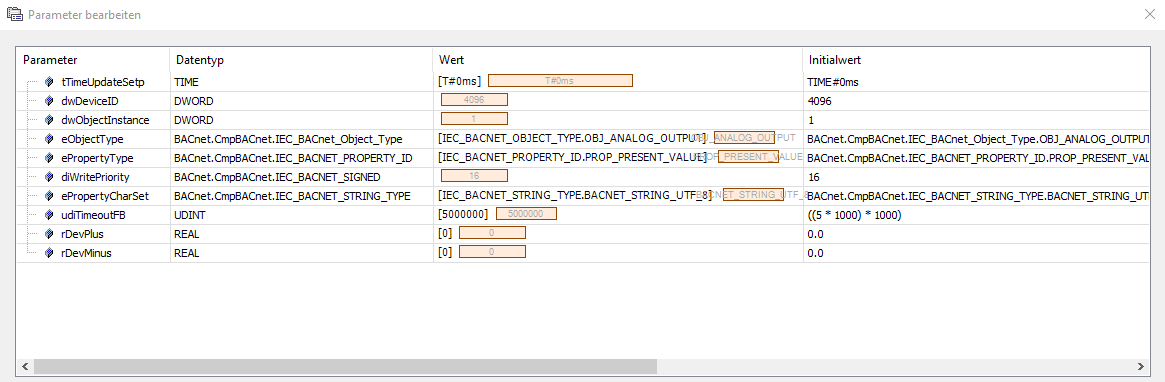
| **tTimeUpdateSetp** | TIME | | T#0s | Update interval for the processes affected by the input ‘xUpdateSetp’ (0 = no automatic update, > 0 cyclic update) |
| **dwDeviceID** | DWORD | | 4096 | Number of the BACnet target device (range: 0 - 4194302) |
| **dwObjectInstance** | DWORD | | 1 | Number of the object (range: 0 - 4194303) |
| **eObjectType** | BACnet.CmpBACnet.IEC\_BACnet\_Object\_Type | | BACnet.CmpBACnet.IEC\_BACnet\_Object\_Type.OBJ\_ANALOG\_OUTPUT | Type of the object |
| **ePropertyType** | BACnet.CmpBACnet.IEC\_BACNET\_PROPERTY\_ID | | BACnet.CmpBACnet.IEC\_BACNET\_PROPERTY\_ID.PROP\_PRESENT\_VALUE | Property type |
| **diWritePriority** | BACnet.CmpBACnet.IEC\_BACNET\_SIGNED | | 16 | Priority of the property (1 = highest, 16 = lowest priority) |
| **ePropertyCharSet** | BACnet.CmpBACnet.IEC\_BACNET\_STRING\_TYPE | | BACnet.CmpBACnet.IEC\_BACNET\_STRING\_TYPE.BACNET\_STRING\_UTF\_8 | Character set of the property |
| **udiTimeoutFB** | UDINT | | 5\*1000\*1000 | Duration of the timeout for the instance of the FB BACnet.BACnetClientWriteProperty (in microseconds, 0 = no timeout, CBML ETrigATo) |
| **rDevPlus** | REAL | | 0.0 | Maximum positive deviation of the input variable ‘rSetpValue’ (type: REAL) before triggering the update of the setpoint |
| **rDevMinus** | REAL | | 0.0 | Maximum negative deviation of the input variable ‘rSetpValue’ (type: REAL) before triggering the update of the setpoint |
### Functional description
#### General
This function block transfers setpoints of properties via BACNET communication (write access).\
The selection of the setpoint input is made via input ‘eSetpValueMode’ (default = Auto).\
The selection of the BACNET data type is made via input ‘ePropertyDataTypeMode’ (default = Auto).\
The current BACNET data type is available at output ‘eActPropertyDataType’.\
The currently selected input for the setpoint is available at output ‘sInputSetpValue’.
#### Enable / disable communication
Enabling / disabling communication is done via input ‘xEn’ (default = TRUE = enable).\
On every rising edge at input ‘xEn’, a transmission of the setpoint with the current settings is triggered.\
When disabled, the outputs from ‘xRegToServer’ downward assume predefined states; at the same time, a deregistration from the server takes place.
#### Input ‘eSetpValueMode’
The operating mode of the setpoint input is selected by this input as follows. It specifies the input that is monitored for changes in the setpoint. In operating mode ‘Auto’, the input is automatically determined by the state of output ‘eActPropertyDataType’ (by the parameters ‘eObjectType’ and ‘ePropertyType’). In operating mode ‘Auto’ and simultaneous operating mode ePropertyDataTypeMode = ePropertyDataType, the input ‘stSetpValue’ is selected automatically.
| *eSetpValueMode* | Function | Notes |
| ----------------------- | ------------------------------------------------ | ------------------------------------- |
| None | Transmission trigger disabled | |
| Auto | Selection of the input by ‘eActPropertyDataType’ | |
| rSetpValue | Manual mode - input ‘rSetpValue’ | |
| xSetpValue | Manual mode - input ‘xSetpValue’ | |
| sSetpValue\_String | Manual mode - input ‘sSetpValue’ | Mode: character string (CHAR\_STRING) |
| sSetpValue\_Bit\_String | Manual mode - input ‘sSetpValue’ | Mode: bit string (BIT\_STRING) |
| diSetpValue | Manual mode - input ‘diSetpValue’ | |
| udiSetpValue | Manual mode - input ‘udiSetpValue’ | |
| stSetpValue | Manual mode - input ‘stSetpValue’ | Direct access to the interface |
#### Input ‘ePropertyDataTypeMode’
The operating mode of the BACNET data type is selected by this input as follows. It defines the BACNET data type that is transmitted in the UDP telegram. In operating mode ‘Auto’, the BACNET data type is selected automatically by the parameters ‘eObjectType’ and ‘ePropertyType’. In operating mode ‘ePropertyDataType’ and simultaneous operating mode eSetpValueMode = Auto, the input ‘stSetpValue’ is selected automatically.
| *ePropertyDataTypeMode* | Function | Notes |
| ----------------------- | -------------------------------------------------------------------------------------- | ----- |
| None | Transmission trigger disabled | |
| Auto | Definition of the BACNET data type by the parameters ‘eObjectType’ and ‘ePropertyType’ | |
| ePropertyDataType | Manual mode - input ‘ePropertyDataType’ | |
#### Deleting entries in the priority array
The desired deletion (e.g. array element 16 is written with the value 100.0) of the entry of an array element is performed by setting the current value to NULL (= 0) and the data type to be transmitted to DATA\_TYPE\_NULL:\
\
eSetpValueMode = ‘udiSetpValue’\
udiSetpValue = 0\
ePropertyDataTypeMode := ‘ePropertyDataType’\
ePropertyDataType = DATA\_TYPE\_NULL\
\
After successful transmission, for example array element 16 is written with the value NULL and is therefore no longer active.
#### Triggering a transmission
The transmission of the property's setpoint can be triggered as follows (requirement: xRegToServer = TRUE)\\
* every rising edge at input ‘xEn’
* every rising edge at input ‘xUpdateSetpn’
* cyclically at interval ‘tTimeUpdateSetp’ (default: T#0s)
* once after each download
* once after every change to the configuration
* once after every change at the active input
#### Configuration of the BACNET object
The BACNET object is uniquely defined by the following parameters:\\
* Device address ‘dwDeviceID’
* Object address ‘dwObjectInstance’
* Object type ‘eObjectType’
* Property type ‘ePropertyType’
* Write priority ‘diWritePriority’
* Timeout for FB ‘udiTimeoutFB’
#### Input ‘rSetpValue’
The transmission of the property's setpoint is triggered (requirement: xRegToServer = TRUE) if the change exceeds the parameter ‘rDevPlus’, or falls below the parameter ‘rDevMinus’.
#### Input ‘stSetpValue’
This input is a direct access to the internal interface of the transmission. (Data type = BACnet.CmpBACnet.IEC\_BACNET\_PROPERTY\_CONTENTS)\
Therefore, the CFC must ensure that all structure elements are initialized correctly!!!\
The transmission of the property's setpoint is triggered (requirement: xRegToServer = TRUE) if at least one change has been detected in the structure.
#### Output ‘sInputSetpValue’
The current input for the setpoint is permanently available at this output as a string.
#### Output ‘xRegToServer’
The status of the internal connection to the BACNET server is permanently available at this output. Successful connection establishment to the server is a prerequisite for transmitting the setpoint.
#### Output ‘xConfigObject’
The successful configuration of the BACNET object is permanently available at this output.
#### Output ‘xSuccTransfer’
The status of the BACNET transmission is permanently available at this output. After each successful transmission, a rising edge is generated here.
#### Display of faults
Faults are displayed at the collective output ‘xAlarm’ (= TRUE).\
It includes only communication faults here (time delay: gc\_Parameters.gc\_tOnDelayxAlarmCom, default = 60s) (output ‘xAlarmCom’).\
In the event of a communication error, output ‘eErrorCodeCom’ provides explanatory text for the cause. It always displays the cause of the last communication error.\
In the event of an error in the response telegram, output ‘eReplyErrorCode’ provides explanatory text for the cause.
#### Output ‘xBusy’
This output signals the active transmission of the setpoint (= TRUE).
### Example
### CODESYS
InOut:
| Scope | Name | Type | Initial | Comment |
| ----------- | ----------------------- | ----------------------------------------------- | ----------------------------------------------------------------- | ---------------------------------------------------------------------------------------------------------------------------------------------------------------------------------------------------------------------------------------------------------------------------------------------------------------------------------------------------------------------------------------------------------------------- |
| Input | `xEn` | `BOOL` | TRUE | Enable / disable communication ( TRUE = enable ) |
| Input | `itfServer` | `BACnet.IBACnetServer` | | Interface variable for referencing the server |
| Input | `eSetpValueMode` | ClientWriteProperty\_SetpValueMode | ClientWriteProperty\_SetpValueMode.Auto |
Selection of the operating mode for the setpoint input 0 = None 1 = Automatic mode (the input is selected automatically) 2 = Manual mode: input ‘rSetpValue’ 3 = Manual mode: input ‘xSetpValue’ 4 = Manual mode: input ‘sSetpValue’ 5 = Manual mode: input ‘diSetpValue’ 6 = Manual mode: input ‘udiSetpValue’ 7 = Manual mode: input ‘stSetpValue’ (direct transfer to the interface)
Selection of the operating mode for the transmitted property data type 0 = None 1 = Automatic mode (the data type is selected automatically) 2 = Manual mode: input ‘ePropertyDataType’
Setpoint of the property in IEC\_BACNET\_PROPERTY\_CONTENTS format (direct transfer to the interface)
|
| Input | `xUpdateSetp` | `BOOL` | FALSE |
Setpoint update (on every rising edge )
|
| Input | `xResError` | `BOOL` | FALSE |
Resetting of output ‘eError’ ( on every rising edge )
|
| Output | `dwDeviceID_Fb` | `DWORD` | |
Number of the BACnet target device (range: 0 - 4194302) - feedback
|
| Output | `dwObjectInstance_Fb` | `DWORD` | | Number of the object (range: 0 - 4194303) - feedback |
| Output | `eObjectType_Fb` | `BACnet.CmpBACnet.IEC_BACnet_Object_Type` | | Type of the object - feedback |
| Output | `ePropertyType_Fb` | `BACnet.CmpBACnet.IEC_BACNET_PROPERTY_ID` | | Property type - feedback |
| Output | `eActPropertyDataType` | `BACnet.CmpBACnet.IEC_BACNET_DATA_TYPE` | |
BACNET data type of the property Automatic determination based on ‘eObjectType’ and ‘ePropertyType’ (ePropertyDataTypeMode = Auto) Manual specification via input ‘ePropertyDataType’ (ePropertyDataTypeMode = ePropertyDataType) Transfer to the ‘tag’ element of the IEC\_BACNET\_PROPERTY\_CONTENTS structure Immediate transmission in the UDP telegram
|
| Output | `sInputSetpValue` | `STRING` | ‘’ | Display of the input for the property setpoint |
| Output | `xRegToServer` | `BOOL` | |
Status of registration with the BACnet server ( TRUE = successful registration )
|
| Output | `xConfigObject` | `BOOL` | |
Status of object configuration ( TRUE = successful configuration )
|
| Output | `xSuccTransfer` | `BOOL` | FALSE | Status of the successful update of the property's setpoint (TRUE = transmission successful) |
| Output | `eCBMState` | `BACnet.CmpBACnet.IEC_BACNET_STATUS` | |
CBM - communication status ( update: states DONE, ERROR and ABORT )
Duration of the timeout for the instance of the FB BACnet.BACnetClientWriteProperty (in microseconds, 0 = no timeout, CBML ETrigATo)
|
| Input Const | `ePropertyCharSet` | `BACnet.CmpBACnet.IEC_BACNET_STRING_TYPE` | BACnet.CmpBACnet.IEC\_BACNET\_STRING\_TYPE.BACNET\_STRING\_UTF\_8 | Character set of the property |
| Input Const | `diWritePriority` | `BACnet.CmpBACnet.IEC_BACNET_SIGNED` | 16 |
Priority of the property (1 = highest, 16 = lowest priority)
|
| Input Const | `ePropertyType` | `BACnet.CmpBACnet.IEC_BACNET_PROPERTY_ID` | BACnet.CmpBACnet.IEC\_BACNET\_PROPERTY\_ID.PROP\_PRESENT\_VALUE | Property type |
| Input Const | `eObjectType` | `BACnet.CmpBACnet.IEC_BACnet_Object_Type` | BACnet.CmpBACnet.IEC\_BACnet\_Object\_Type.OBJ\_ANALOG\_OUTPUT | Type of the object |
| Input Const | `dwObjectInstance` | `DWORD` | 1 | Number of the object (range: 0 - 4194303) |
| Input Const | `dwDeviceID` | `DWORD` | 4096 | Number of the BACnet target device (range: 0 - 4194302) |
| Input Const | `tTimeUpdateSetp` | `TIME` | TIME#0ms |
Update interval for the processes influenced by the input ‘xUpdateSetp’
|
Methods:
> CHECK\_BUFFER\_CHANGE
> FB\_Exit
Structure:
* CHECK\_BUFFER\_CHANGE (Method)
* FB\_Exit (Method)
---
# Agent Instructions
This documentation is published with GitBook. GitBook is the documentation platform designed so that both humans and AI agents can read, navigate, and reason over technical content effectively. Learn more at gitbook.com.
## Querying This Documentation
If you need additional information that is not directly available in this page, you can query the documentation by asking a question.
Perform an HTTP GET request on the following URL with the `ask` and `goal` query parameters:
```
GET https://support.powerio.com/hub/codesys-hvac/en/hvac-bacnet2-library/funktionsbausteine/client-objekte/clientwriteproperty_manyinputs.md?ask=&goal=
```
`ask` is the immediate question: it should be specific, self-contained, and written in natural language.
`goal` is what the user is ultimately trying to achieve, the reason they need the answer. Sharing it helps GitBook give you a better, more relevant answer. A goal is most helpful when it describes the outcome the user wants rather than restating the question. For example, with `ask=how do I create an API token`, a goal like `automate deployments from our CI pipeline` lets GitBook tailor the answer to that use case.
The response will contain a direct answer to the question and relevant excerpts and sources from the documentation.
Use this mechanism when the answer is not explicitly present in the current page, you need clarification or additional context, or you want to retrieve related documentation sections.