> For the complete documentation index, see [llms.txt](https://support.powerio.com/hub/llms.txt). Markdown versions of documentation pages are available by appending `.md` to page URLs; this page is available as [Markdown](https://support.powerio.com/hub/t1.b100/description.md).
# Beschreibung
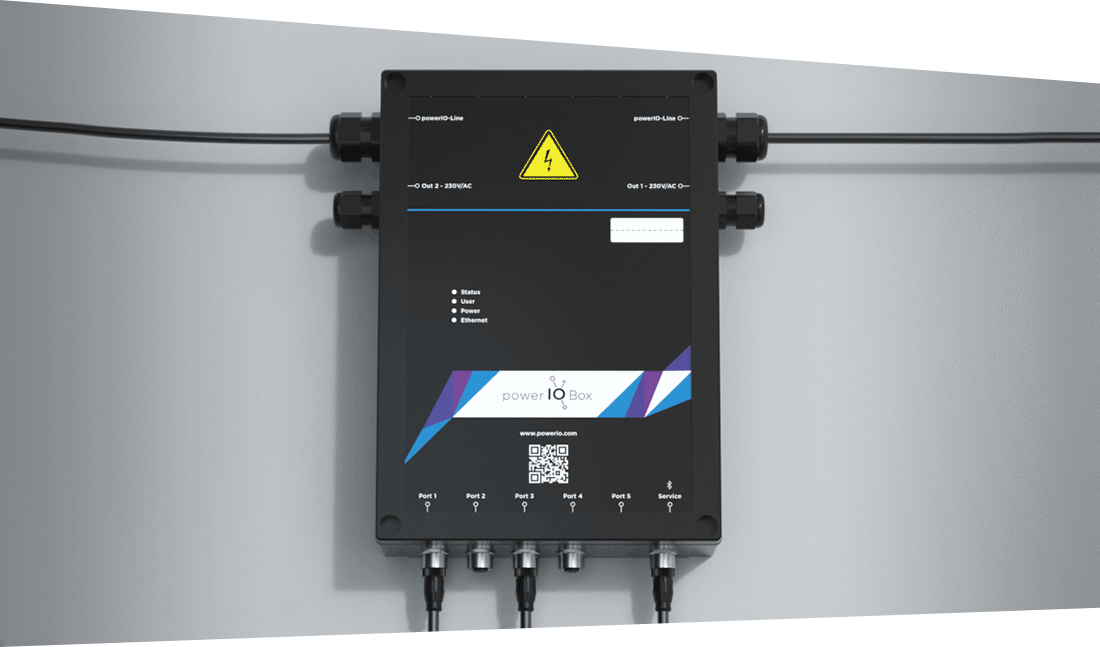
powerIO® T1.B100
Die powerIO® T1.B100 Box ist eine umfassende und vielseitige Lösung für die Gebäudeautomation, die verschiedene Funktionen und Merkmale kombiniert:
* Sie ermöglicht die Anbindung von kommunikativen Sensoren und Aktoren über standardisierte Industrie M12 Steckverbindungen und unterstützt bis zu 32 powerIO®-Boxen pro powerIO®-Line. Je M12 Port können bis zu 32 serielle Teilnehmer angeschlossen werden.
* Die Box kann durch verschiedene Erweiterungsplatinen ergänzt werden, um unterschiedliche Zusatzprotokolle zu unterstützen.
* Mit einer 100 Mbit/s Ethernet TCP/IP Kommunikation und einer 230V Spannungsversorgung über die powerIO®-Line bietet sie eine zuverlässige Infrastruktur.
* Die T1.B100 Box verfügt über ein 24V DC/2A Netzteil zur Versorgung von Sensoren und Aktoren sowie eine Weboberfläche und eine App zur Konfiguration.
* Sie ermöglicht die automatische Konvertierung von seriellen Protokollen auf TCP-Protokolle, wie zum Beispiel Modbus RTU auf Modbus TCP.
* Als CODESYS-Steuerung kann die Box zur Programmierung und Steuerung verschiedener Automationsprozesse eingesetzt werden.
* Die Installation von Apps wie dem HVAC Automation Portal Cloud Adapter und Node-RED erweitert die Funktionalität der Box und trägt zu ihrer Rolle als umfassende Lösung für die Gebäudeautomation bei.
Insgesamt bietet die powerIO® T1.B100 Box eine flexible und skalierbare Plattform, die sich an verschiedene Anforderungen in der Gebäudeautomation anpassen kann und die Integration unterschiedlicher Systeme erleichtert.
{% embed url="" %}
---
# Agent Instructions
This documentation is published with GitBook. GitBook is the documentation platform designed so that both humans and AI agents can read, navigate, and reason over technical content effectively. Learn more at gitbook.com.
## Querying This Documentation
If you need additional information that is not directly available in this page, you can query the documentation by asking a question.
Perform an HTTP GET request on the following URL with the `ask` and `goal` query parameters:
```
GET https://support.powerio.com/hub/t1.b100/description.md?ask=&goal=
```
`ask` is the immediate question: it should be specific, self-contained, and written in natural language.
`goal` is what the user is ultimately trying to achieve, the reason they need the answer. Sharing it helps GitBook give you a better, more relevant answer. A goal is most helpful when it describes the outcome the user wants rather than restating the question. For example, with `ask=how do I create an API token`, a goal like `automate deployments from our CI pipeline` lets GitBook tailor the answer to that use case.
The response will contain a direct answer to the question and relevant excerpts and sources from the documentation.
Use this mechanism when the answer is not explicitly present in the current page, you need clarification or additional context, or you want to retrieve related documentation sections.