> For the complete documentation index, see [llms.txt](https://support.powerio.com/hub/llms.txt). Markdown versions of documentation pages are available by appending `.md` to page URLs; this page is available as [Markdown](https://support.powerio.com/hub/orbit/verwaltung/einstellungen/archivanalyse.md).

# Archivanalyse

So steuern Sie in powerIO Orbit die automatische Analyse von CODESYS, SBC und KNX Archiven und holen die Analyse für ältere Archive nach.

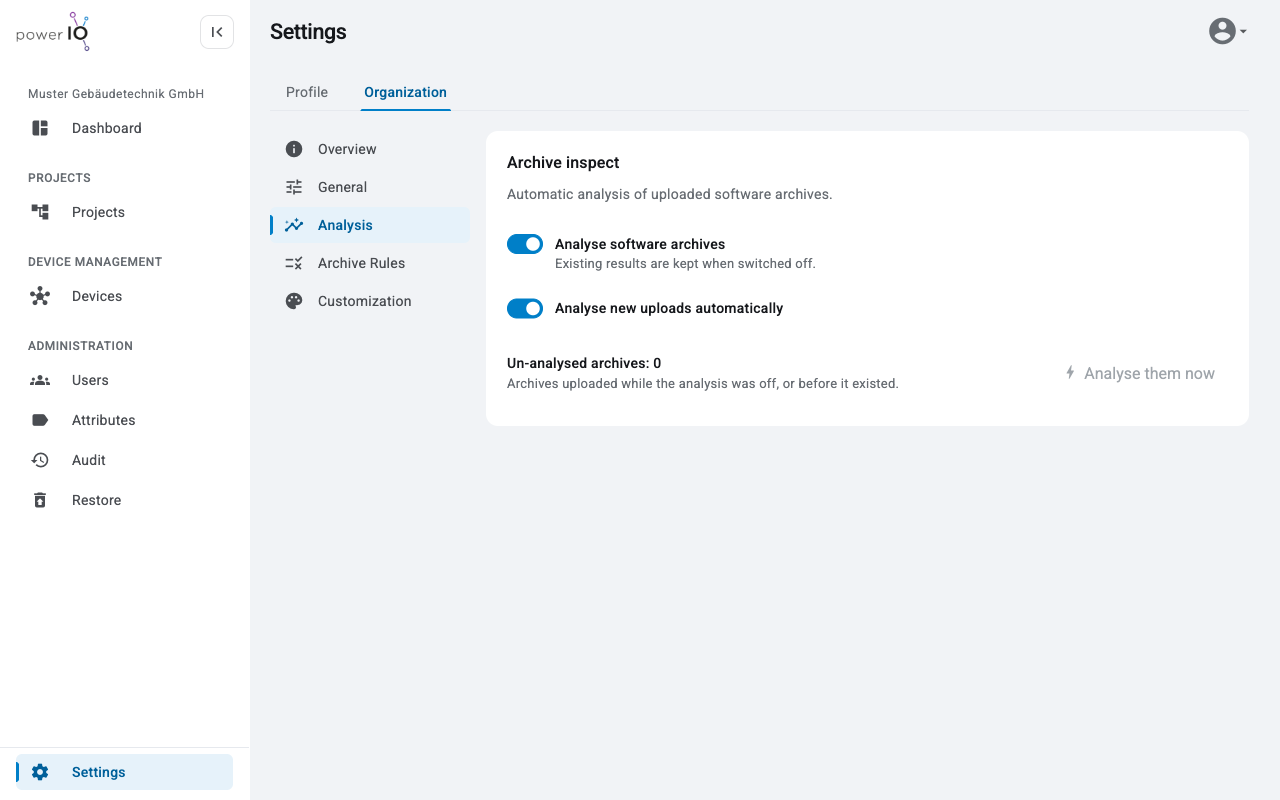
Unter **Analysis** legen Sie fest, ob Orbit Softwarearchive analysiert und ob das direkt nach jedem Upload geschieht. Die Analyse liest Werte wie die CODESYS Version oder die ETS Version aus dem Archiv, ohne dass jemand das Projekt öffnen muss. Ändern dürfen das der **Customer admin** und Rollen mit **Update customer data**.

<figure><picture><source srcset="/files/i6lkamvEu5WqfQjqMvak" media="(prefers-color-scheme: dark)"><img src="https://304133783-files.gitbook.io/~/files/v0/b/gitbook-x-prod.appspot.com/o/spaces%2FcCl0f7fHRZGoIU6rAFRD%2Fuploads%2Fgit-blob-2a0a6f4799a19f33e3d2aead64f46957e0df525a%2Forbit-settings-analysis.png?alt=media" alt="Bereich Analysis mit dem Abschnitt Archive inspect, den Schaltern Analyse software archives und Analyse new uploads automatically und dem Button Analyse them now"></picture><figcaption><p>Archivanalyse unter Analysis</p></figcaption></figure>

## Analyse ein- und ausschalten

Beide Schalter sind in der Grundeinstellung aktiv und wirken sofort, ein Speichern ist nicht erforderlich.

| Schalter                              | Wirkung                                                                                                      |
| ------------------------------------- | ------------------------------------------------------------------------------------------------------------ |
| **Analyse software archives**         | Schaltet die Analyse für die ganze Organisation ein oder aus. Vorhandene Ergebnisse bleiben erhalten.        |
| **Analyse new uploads automatically** | Analysiert jedes neue Archiv direkt nach dem Upload. Der Schalter lässt sich nur bei aktiver Analyse ändern. |

Ohne automatische Analyse zeigt ein neues Archiv den Status **Not analysed**. Ein Klick auf den Status startet die Analyse für dieses Archiv.

## Analyse nachholen

**Un-analysed archives** zählt die Archive, die bei ausgeschalteter Analyse oder vor Einführung der Analyse hochgeladen wurden. Mit **Analyse them now** analysiert Orbit alle diese Archive. Der Button ist aktiv, wenn die Analyse eingeschaltet ist und es solche Archive gibt.

Eine Analyse dauert bis zu <code class="expression">space.vars.analysis\_max\_minutes</code> Minuten pro Archiv. Das Ergebnis erscheint ohne neues Laden der Seite.

## Archivanalyse und Tarif

Die Archivanalyse ist Teil des Tarifs. Ohne sie zeigt Orbit unter **Analysis** den Hinweis **Archive inspect is not part of your plan. Existing analysis results stay visible.** Ergebnisse aus früheren Analysen bleiben dann sichtbar.


---

# Agent Instructions
This documentation is published with GitBook. GitBook is the documentation platform designed so that both humans and AI agents can read, navigate, and reason over technical content effectively. Learn more at gitbook.com.

## Querying This Documentation
If you need additional information that is not directly available in this page, you can query the documentation by asking a question.

Perform an HTTP GET request on the following URL with the `ask` and `goal` query parameters:

```
GET https://support.powerio.com/hub/orbit/verwaltung/einstellungen/archivanalyse.md?ask=<question>&goal=<user_goal>
```

`ask` is the immediate question: it should be specific, self-contained, and written in natural language.
`goal` is what the user is ultimately trying to achieve, the reason they need the answer. Sharing it helps GitBook give you a better, more relevant answer. A goal is most helpful when it describes the outcome the user wants rather than restating the question. For example, with `ask=how do I create an API token`, a goal like `automate deployments from our CI pipeline` lets GitBook tailor the answer to that use case.

The response will contain a direct answer to the question and relevant excerpts and sources from the documentation.

Use this mechanism when the answer is not explicitly present in the current page, you need clarification or additional context, or you want to retrieve related documentation sections.
