> For the complete documentation index, see [llms.txt](https://support.powerio.com/hub/llms.txt). Markdown versions of documentation pages are available by appending `.md` to page URLs; this page is available as [Markdown](https://support.powerio.com/hub/orbit/projekte/projekte.md).
# Projekte und Elemente
In powerIO Orbit bilden Projekte Gebäude und Anlagen als Baum aus Collections und Items ab. Die Seite erklärt Elemente, Softwarearchive, Anhänge und Ansichten.
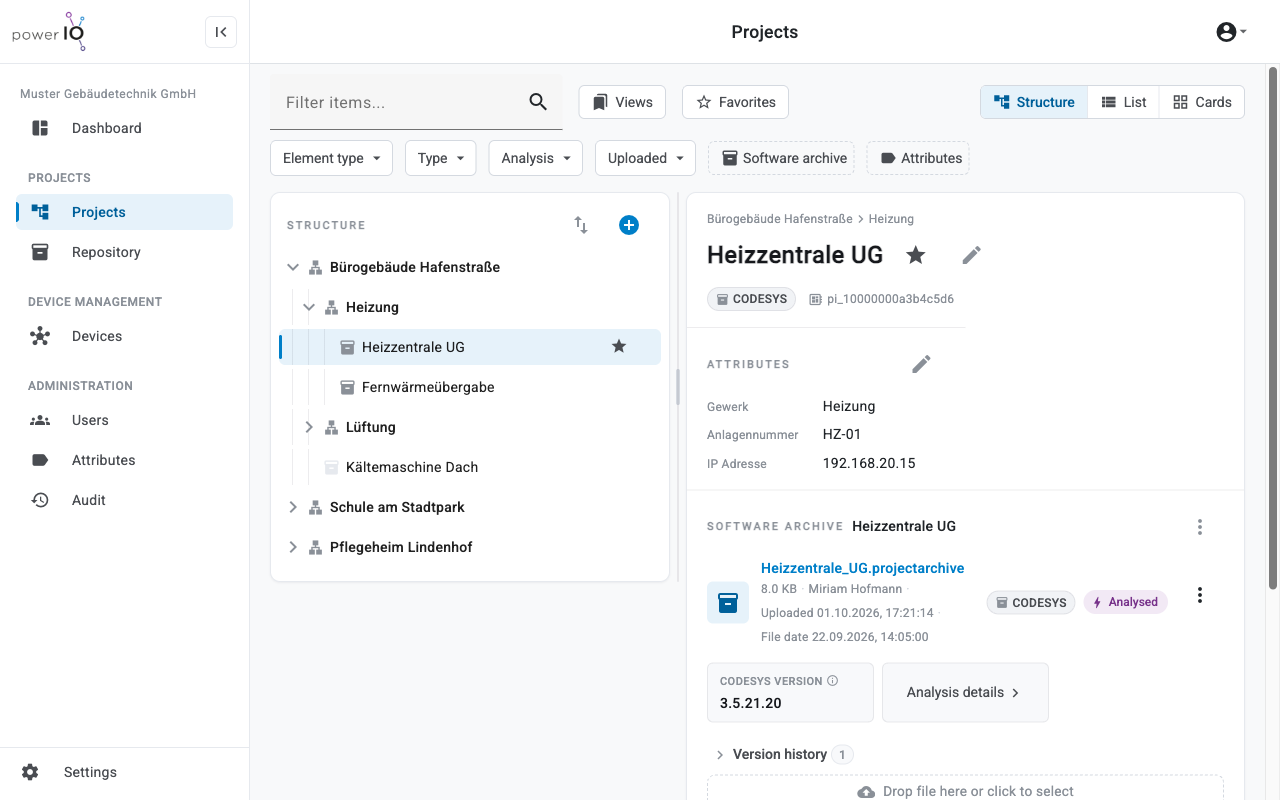
Ein Projekt in powerIO Orbit bildet ein Gebäude oder eine Anlage als Baum ab. Der Baum besteht aus Elementen vom Typ **Collection** und **Item**. Ein Item speichert das Projekt einer Steuerung als Softwarearchiv, dazu beliebige Anhänge mit Versionsverlauf.
Projektbaum und Details eines Items mit Attributen und Softwarearchiv
## Collection und Item
Jedes Element im Projektbaum ist entweder eine Collection oder ein Item. Die Elemente auf oberster Ebene sind Ihre Projekte und zählen für das Projektkontingent Ihres Tarifs.
| Typ | Zweck | Softwarearchiv | Anhänge |
| -------------- | -------------------------------------------------------------------------------------------------------------- | ------------------ | ------- |
| **Collection** | Gliedert Items, zum Beispiel nach Gebäudeteil oder Gewerk, und zeigt die Softwarearchive aller Items darunter. | Nein | Ja |
| **Item** | Steht für eine Steuerung oder eine Anlage, zum Beispiel eine Lüftungsanlage. | Ein Softwarearchiv | Ja |
Über das Kontextmenü eines Elements wandeln Sie ein Item in eine Collection um und umgekehrt. Ein Item mit Softwarearchiv lässt sich nicht in eine Collection umwandeln.
## Softwarearchive und Anhänge
Ein Softwarearchiv ist das Projekt einer Steuerung, zum Beispiel ein CODESYS Projekt. powerIO Orbit erkennt beim Upload den Typ **CODESYS** oder **SBC**. Jeder Upload einer neuen Datei erzeugt eine neue Version, ältere Versionen stehen unter **Version history**.
In der Grundeinstellung analysiert Orbit Archive vom Typ CODESYS und SBC nach dem Upload automatisch. Das Ergebnis zeigt zum Beispiel die CODESYS Version, weitere Werte stehen unter **Analysis details**.
Anhänge sind beliebige Dateien zu einem Element, zum Beispiel Anlagenschemata oder Inbetriebnahmeprotokolle. Anhänge sind ebenfalls versioniert.
## Ansichten Structure, List und Cards
Den Bereich **Projects** zeigen Sie in drei Ansichten.
| Ansicht | Darstellung |
| ------------- | ------------------------------------------------------------------------------- |
| **Structure** | Projektbaum links und die Details des gewählten Elements rechts |
| **List** | Tabelle der Elemente mit wählbaren Spalten, standardmäßig nur die oberste Ebene |
| **Cards** | Eine Karte pro Element, sortierbar nach Struktur, Name oder letztem Upload |
Mit dem Suchfeld **Filter items...** und den Filtern über dem Baum grenzen Sie die Elemente ein, zum Beispiel nach **Type** des Softwarearchivs. Unter **Views** speichern Sie Suche und Filter als Ansicht und teilen sie bei Bedarf mit Ihrer Organisation.
## Attribute
Attribute beschreiben Elemente mit eigenen Feldern, zum Beispiel Anlagennummer oder IP Adresse. Den gemeinsamen Katalog der Attribute pflegt Ihre Organisation im Bereich **Attributes**. Attribute, die als filterbar markiert sind, erscheinen als Filter im Bereich **Projects**.
---
# Agent Instructions
This documentation is published with GitBook. GitBook is the documentation platform designed so that both humans and AI agents can read, navigate, and reason over technical content effectively. Learn more at gitbook.com.
## Querying This Documentation
If you need additional information that is not directly available in this page, you can query the documentation dynamically by asking a question.
Perform an HTTP GET request on the current page URL with the `ask` query parameter, and the optional `goal` query parameter:
```
GET https://support.powerio.com/hub/orbit/projekte/projekte.md?ask=&goal=
```
`ask` is the immediate question: it should be specific, self-contained, and written in natural language.
`goal` is optional and describes the broader end goal you are ultimately trying to accomplish on behalf of the user. GitBook uses it to tailor the answer towards what is most useful for that goal.
The response will contain a direct answer to the question and relevant excerpts and sources from the documentation.
Use this mechanism when the answer is not explicitly present in the current page, you need clarification or additional context, or you want to retrieve related documentation sections.