> For the complete documentation index, see [llms.txt](https://support.powerio.com/hub/llms.txt). Markdown versions of documentation pages are available by appending `.md` to page URLs; this page is available as [Markdown](https://support.powerio.com/hub/orbit/en/administration/audit-und-papierkorb.md).

# Audit log and recycle bin

How to see in powerIO Orbit who changed what and when, and restore deleted elements and files from the recycle bin.

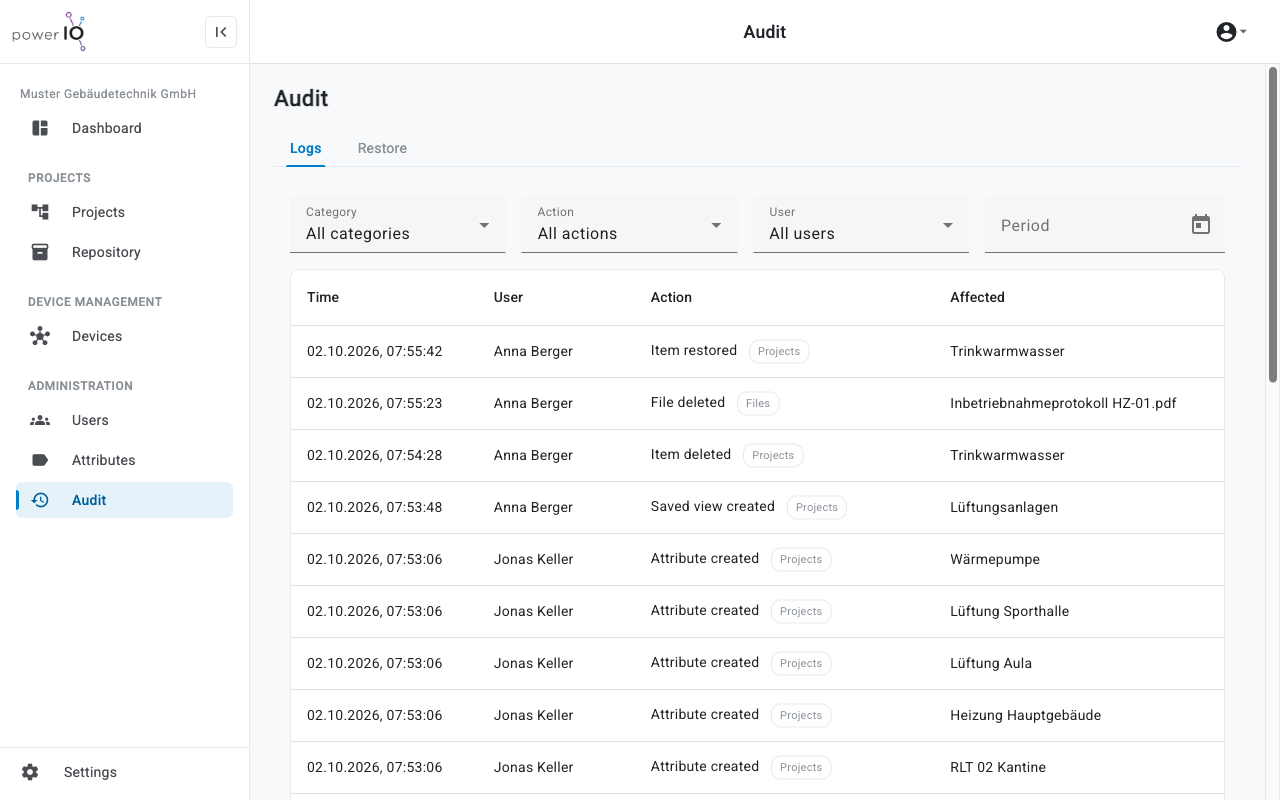
In the section **Audit** the tab holds **Logs** records every change in your organization, with time, user and affected content. The tab **Restore** shows how long each deleted entry can still be restored.

{% hint style="info" %}
Which areas and functions you see in powerIO Orbit depends on your roles and your organization's plan. If a function is missing, contact the **Customer admin** your organization.
{% endhint %}

## Audit Log

The audit log is viewed by the **Customer admin** in the Premium P1 and Unlimited U1 plans. Orbit records the changes in every plan. After switching to one of these plans, the older history is therefore also visible.

<figure><picture><source srcset="/files/43941b7e08dab50109fe4444691293b8716c09fd" media="(prefers-color-scheme: dark)"><img src="https://4132839365-files.gitbook.io/~/files/v0/b/gitbook-x-prod.appspot.com/o/spaces%2FcCl0f7fHRZGoIU6rAFRD%2Fuploads%2Fgit-blob-616e0ec1369bdb7f88c042932af6e8e5176954cb%2Forbit-audit-logs.png?alt=media" alt="Tab Logs im Bereich Audit mit den Filtern Category, Action, User und Period und einer Liste von Änderungen"></picture><figcaption><p>Audit log with filters</p></figcaption></figure>

With **Category**, **Action**, **User** and **Period** narrow down the list. Clicking a row shows the details of the change, and for modified values the old and new value.

| Plan         | Retention in the Audit Log                                             |
| ------------ | ---------------------------------------------------------------------- |
| Premium P1   | <code class="expression">space.vars.audit\_days\_premium</code> Days   |
| Unlimited U1 | <code class="expression">space.vars.audit\_days\_unlimited</code> Days |

A brief overview of the latest changes is shown to all users by the **Dashboard** under **Recent activity**.

## Trash

In the Starter S1, Premium P1 and Unlimited U1 plans, Orbit moves deleted content to the trash. An item ends up there with all subitems as a single entry.
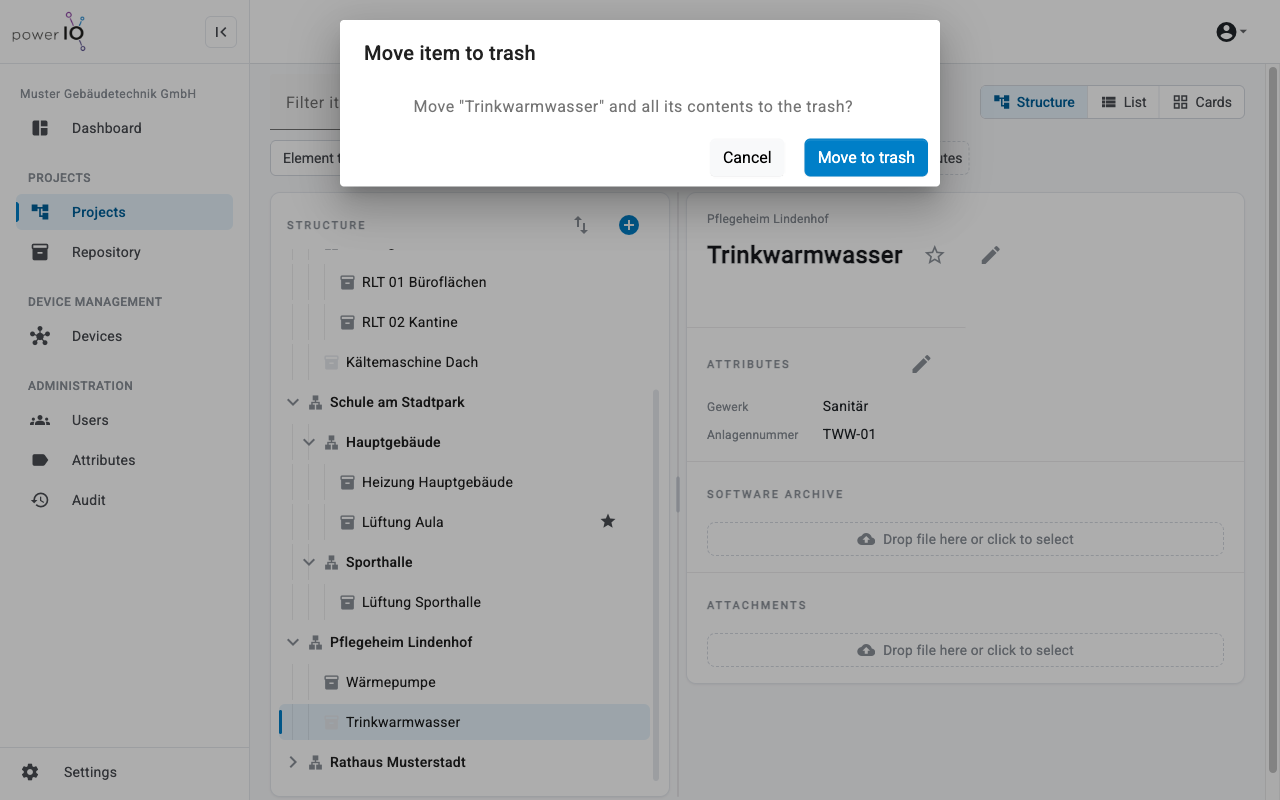
<figure><picture><source srcset="/files/451102dda3793d560ef37a201793ec1a91af71b5" media="(prefers-color-scheme: dark)"><img src="https://4132839365-files.gitbook.io/~/files/v0/b/gitbook-x-prod.appspot.com/o/spaces%2FcCl0f7fHRZGoIU6rAFRD%2Fuploads%2Fgit-blob-a1d1c59bf89124d98d57caf122054c54b74e876d%2Forbit-projects-loeschen-dialog.png?alt=media" alt="Dialog Move item to trash mit der Frage, ob Trinkwarmwasser mit allen Inhalten in den Papierkorb soll"></picture><figcaption><p>Move an item to the trash</p></figcaption></figure>

{% hint style="warning" %}
**WARNING**

Data loss in the Free plan. This plan has no trash; Orbit deletes items and files permanently immediately.

* Check whether you still need the item or file before deleting it.
* Download important software archives beforehand.
  {% endhint %}

| Plan         | Retention in the trash                                                 |
| ------------ | ---------------------------------------------------------------------- |
| Starter S1   | <code class="expression">space.vars.trash\_days\_starter</code> Days   |
| Premium P1   | <code class="expression">space.vars.trash\_days\_premium</code> Days   |
| Unlimited U1 | <code class="expression">space.vars.trash\_days\_unlimited</code> Days |

After the period expires, Orbit deletes the entry automatically. Content in the trash continues to count toward your plan's storage until then.

## Restore deleted content

The roles allowed to restore are **Customer admin**, **Project admin** and **Project manager**.

{% stepper %}
{% step %}

### Open trash

Click in the sidebar on **Audit** and select the tab **Restore**. The list shows each entry with type, size, deletion date and the remaining days under **Days left**.
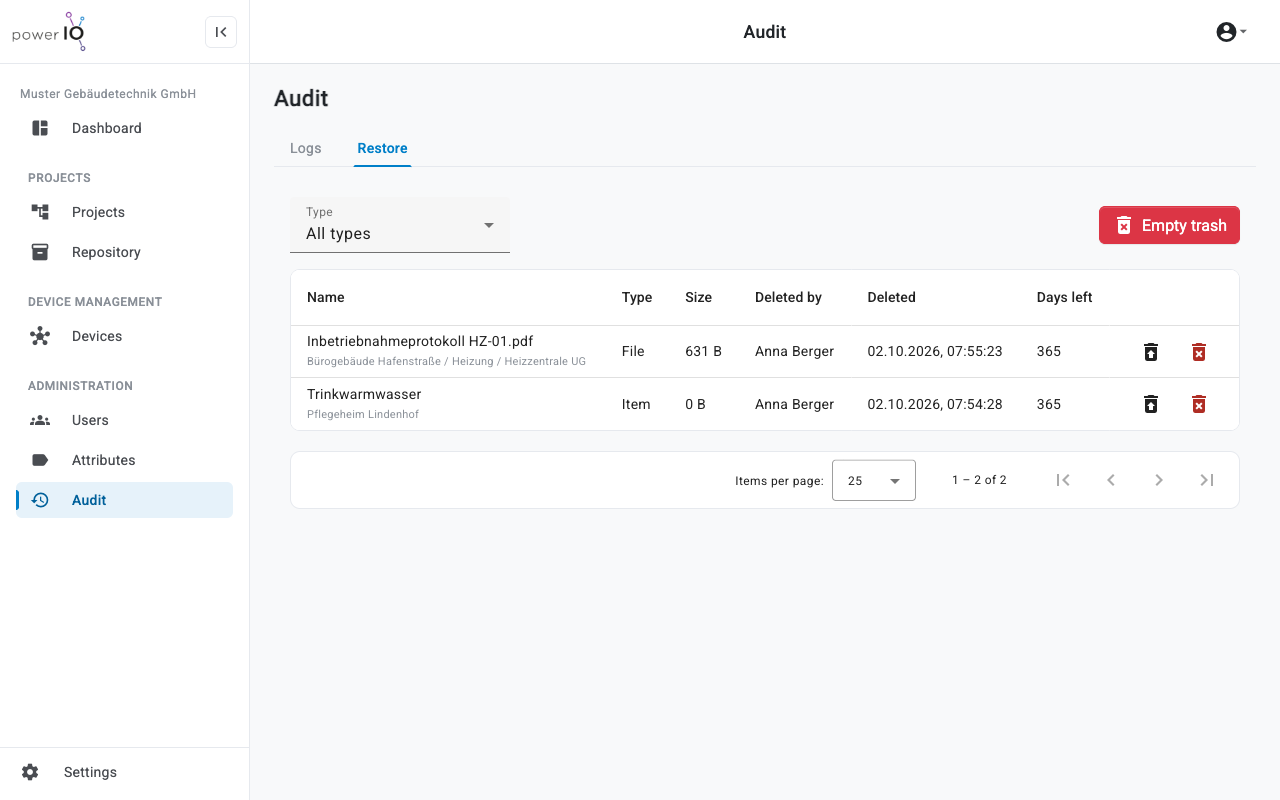
<figure><picture><source srcset="/files/b2535f33d03447f27c15bfd0ddbf3856632b5b9d" media="(prefers-color-scheme: dark)"><img src="https://4132839365-files.gitbook.io/~/files/v0/b/gitbook-x-prod.appspot.com/o/spaces%2FcCl0f7fHRZGoIU6rAFRD%2Fuploads%2Fgit-blob-7899a0fc0a9a922dd0d8f9a884a82b769cda3df2%2Forbit-audit-restore.png?alt=media" alt="Tab Restore mit einer gelöschten Datei und einem gelöschten Item, jeweils mit Days left 365"></picture><figcaption><p>Trash in the Restore tab</p></figcaption></figure>
{% endstep %}

{% step %}

### Restore entry

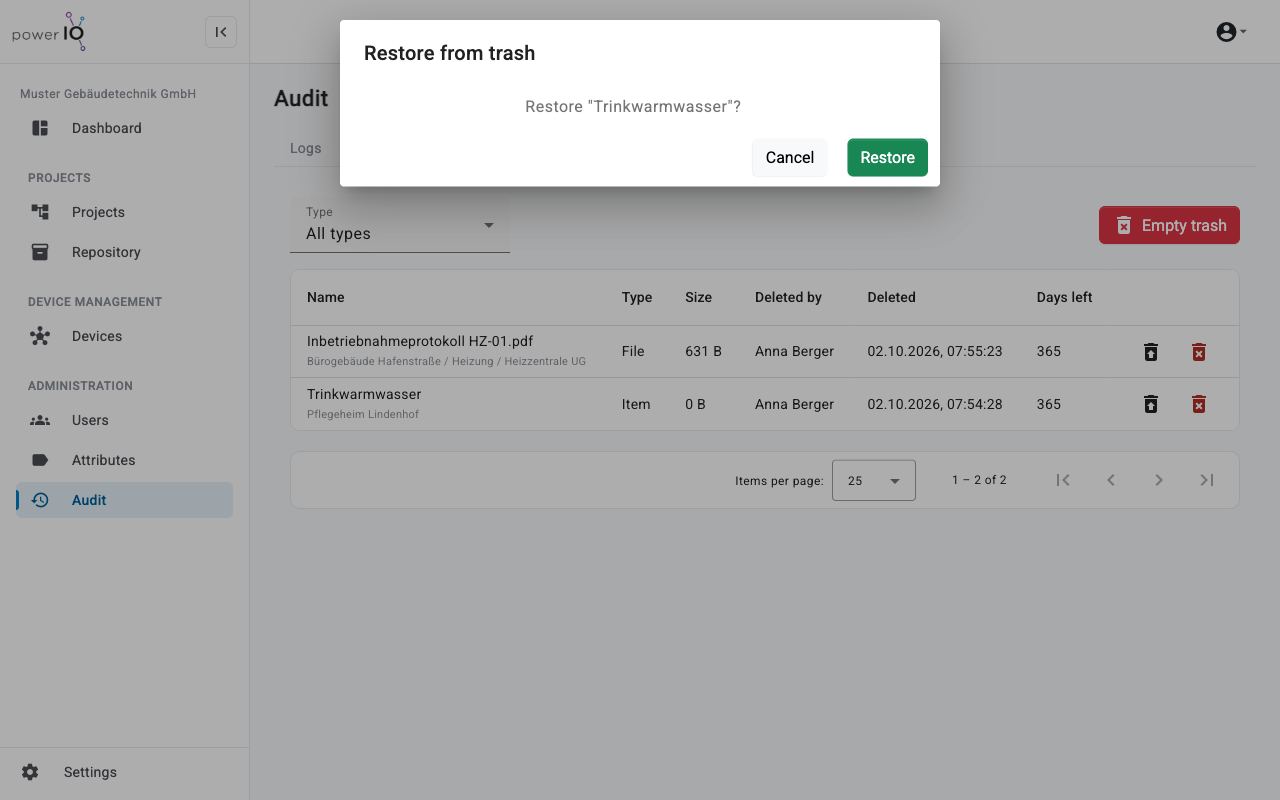
In the entry's row, click the icon **Restore**. The dialog **Restore from trash** appears.
{% endstep %}

{% step %}

### Confirm restore

Click on **Restore**. Orbit restores the content to its old place in the project tree.

<figure><picture><source srcset="/files/7c6bf92295cce47885772afb53ff1f903c69eeb6" media="(prefers-color-scheme: dark)"><img src="https://4132839365-files.gitbook.io/~/files/v0/b/gitbook-x-prod.appspot.com/o/spaces%2FcCl0f7fHRZGoIU6rAFRD%2Fuploads%2Fgit-blob-eb42f0fc78b4aaf44a9616a9003ac471ae439467%2Forbit-audit-restore-dialog.png?alt=media" alt="Dialog Restore from trash mit der Frage, ob Trinkwarmwasser wiederhergestellt werden soll"></picture><figcaption><p>Confirm restore</p></figcaption></figure>
{% endstep %}
{% endstepper %}

The following rules apply when restoring:

* If the parent item is also in the trash, restore that first.
* Orbit does not relink a device that was associated with the deleted item.

## Delete permanently

{% hint style="warning" %}
**WARNING**

Irreversible action. **Delete forever** and **Empty trash** delete content permanently; restoring it is then no longer possible.

* Check the entries before deleting them.
* Enter for confirmation `delete` only if the content is no longer needed.
  {% endhint %}

The **Customer admin** deletes a single entry with the icon **Delete forever** in its row. **Empty trash** empties the entire trash.


---

# Agent Instructions
This documentation is published with GitBook. GitBook is the documentation platform designed so that both humans and AI agents can read, navigate, and reason over technical content effectively. Learn more at gitbook.com.

## Querying This Documentation
If you need additional information that is not directly available in this page, you can query the documentation dynamically by asking a question.

Perform an HTTP GET request on the following URL with the `ask` and `goal` query parameters:

```
GET https://support.powerio.com/hub/orbit/en/administration/audit-und-papierkorb.md?ask=<question>&goal=<user_goal>
```

`ask` is the immediate question: it should be specific, self-contained, and written in natural language.
`goal` is what the user is ultimately trying to achieve, the reason they need the answer. Sharing it helps GitBook give you a better, more relevant answer. A goal is most helpful when it describes the outcome the user wants rather than restating the question. For example, with `ask=how do I create an API token`, a goal like `build a script that syncs our docs to a CMS` lets GitBook tailor the answer to that use case.

The response will contain a direct answer to the question and relevant excerpts and sources from the documentation.

Use this mechanism when the answer is not explicitly present in the current page, you need clarification or additional context, or you want to retrieve related documentation sections.