> For the complete documentation index, see [llms.txt](https://support.powerio.com/hub/llms.txt). Markdown versions of documentation pages are available by appending `.md` to page URLs; this page is available as [Markdown](https://support.powerio.com/hub/codesys-hvac/hvac-library/functionblocks/time/stopwatchext.md).
# StopWatchExt
## `StopWatchExt` (FB)
FUNCTION\_BLOCK StopWatchExt
### Kurzbeschreibung
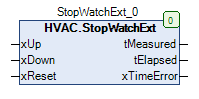
> Messung von Zeitabschnitten mit Plus-/Minus-Eingang und Rücksetzmöglichkeit.\
> Anzeige der Gesamtzeit (*tElapsed*) und der Gesamtzeit vor der letzten Messung (*tMeasured*).
### Darstellung
### Schnittstellen
#### Eingänge
| Name | Datentyp | Wertebereich | Initialwert | Funktion |
| -------- | -------- | ------------ | ----------- | -------------------------------------- |
| *xUp* | BOOL | | | Freigabe der Vergrößerung der Messzeit |
| *xDown* | BOOL | | | Freigabe der Verringerung der Messzeit |
| *xReset* | BOOL | | | Rücksetzung der Stoppuhr |
#### Ausgänge
| Name | Datentyp | Wertebereich | Initialwert | Funktion |
| ------------ | -------- | ------------ | ----------- | ------------------------------------------------ |
| *tMeasured* | TIME | 0 Tage | 0 … 10 Tage | Gemessene Zeit vor der letzten Messung |
| *tElapsed* | TIME | 0 … 10 Tage | | Gemessene Zeitdauer seit der letzten Rücksetzung |
| *xTimeError* | BOOL | | | Anzeige eines Fehlers der Stoppuhr |
### Funktionsbeschreibung
#### Allgemeines
Dieser Funktionsbaustein dient zur Messung von einzelnen Zeitabschnitten.\
Der Zählerstand wird vergrößert, falls der Eingang *xUp* aktiv ist.\
Der Zählerstand wird verringert, falls der Eingang *xDown* aktiv ist.\
Der Eingang *xUp* hat Vorrang vor dem Eingang *xDown*.\
Die Summe der gemessenen Zeitabschnitte wird am Ausgang *tElapsed* dargestellt.\
Die Summe der gemessenen Zeitabschnitte vor der letzten Messung wird am Ausgang *tMeasured* dargestellt.\
Die Summe der gemessenen Zeitabschnitte darf maximal 14400 Minuten (= 10 Tage) und minimal 0 Minuten betragen.\
Jede ansteigende Flanke am Rücksetzeingang (*xReset* = FALSE / TRUE) setzt unabhängig von den übrigen Zuständen die Ausgänge *tElapsed* und *tMeasured* auf FALSE zurück.\
Bei nicht freigegebener Messung (*xUp* = FALSE und *xDown* = FALSE) werden die Ausgänge *tElapsed* und *tMeasured* nicht verändert.
> **Unterschiedliche Reaktion auf eine Flanke am Rücksetzeingang *****xReset***
>
> Eingang *xUp* = TRUE:\
> Jede Flanke am Rücksetzeingang setzt die Ausgänge *tElapsed* und *tMeasured* auf 0 zurück. Anschließend erhöht sich der Zählerstand sofort wieder kontinuierlich.\
> \
> Eingang *xDown* = TRUE:\
> Jede Flanke am Rücksetzeingang setzt die Ausgänge *tElapsed* und *tMeasured* auf 0 zurück.\
> Der Zählerstand ändert sich nicht.\
> Die Fehleranzeige *xTimeError* wird aktiviert, solange der Eingang *xDown* in diesem Zustand TRUE verbleibt.
#### Fehleranzeige *xTimeError*
Sie dient zur Anzeige von Funktionsfehlern (*xTimeError* = TRUE).
| Zustand | *xTimeError* |
| ----------------------------------------------- | ------------ |
| keine Funktionsstörung | FALSE |
| Messzeit größer / gleich 14400 Minuten | TRUE |
| Messzeit kleiner 1ms und Eingang *xDown* = TRUE | TRUE |
### CODESYS
InOut:
| Scope | Name | Type |
| ------ | ------------ | ------ |
| Input | `xUp` | `BOOL` |
| Input | `xDown` | `BOOL` |
| Input | `xReset` | `BOOL` |
| Output | `tMeasured` | `TIME` |
| Output | `tElapsed` | `TIME` |
| Output | `xTimeError` | `BOOL` |
---
# Agent Instructions
This documentation is published with GitBook. GitBook is the documentation platform designed so that both humans and AI agents can read, navigate, and reason over technical content effectively. Learn more at gitbook.com.
## Querying This Documentation
If you need additional information that is not directly available in this page, you can query the documentation by asking a question.
Perform an HTTP GET request on the following URL with the `ask` and `goal` query parameters:
```
GET https://support.powerio.com/hub/codesys-hvac/hvac-library/functionblocks/time/stopwatchext.md?ask=&goal=
```
`ask` is the immediate question: it should be specific, self-contained, and written in natural language.
`goal` is what the user is ultimately trying to achieve, the reason they need the answer. Sharing it helps GitBook give you a better, more relevant answer. A goal is most helpful when it describes the outcome the user wants rather than restating the question. For example, with `ask=how do I create an API token`, a goal like `automate deployments from our CI pipeline` lets GitBook tailor the answer to that use case.
The response will contain a direct answer to the question and relevant excerpts and sources from the documentation.
Use this mechanism when the answer is not explicitly present in the current page, you need clarification or additional context, or you want to retrieve related documentation sections.