# PulseR
## `PulseR` (FB)
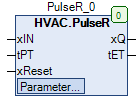
FUNCTION\_BLOCK PulseR
### Kurzbeschreibung
> Flankengesteuerte Impulserzeugung mit einstellbarer Zeitdauer und Rücksetzmöglichkeit.
### Darstellung
 ### Schnittstellen
#### Eingänge
| Name | Datentyp | Wertebereich | Initialwert | Funktion |
| -------- | -------- | ------------ | ----------- | -------------------------------------- |
| *xIN* | BOOL | | | Binärer Eingang (FALSE > TRUE ) |
| *tPT* | TIME | | T#1s | Zeitdauer des Ausgangsimpulses in s |
| *xReset* | BOOL | | | Binärer Rücksetzeingang (FALSE > TRUE) |
#### Ausgänge
| Name | Datentyp | Wertebereich | Initialwert | Funktion |
| ----- | -------- | ------------ | ----------- | -------------------------------------------- |
| *xQ* | BOOL | | | Impulsausgang (FALSE = Aus, TRUE = Ein) |
| *tET* | TIME | 0 … *tPT* | | Aktuelle Zeitdauer des Impulses an *xQ* in s |
#### Sollwerte / Parameter
| Name | Datentyp | Wertebereich | Initialwert | Funktion |
| --------- | -------- | ------------ | ----------- | ---------------------------------- |
| **xTest** | BOOL | | FALSE | Binärer Testeingang (FALSE > TRUE) |
### Funktionsbeschreibung
#### Allgemeines
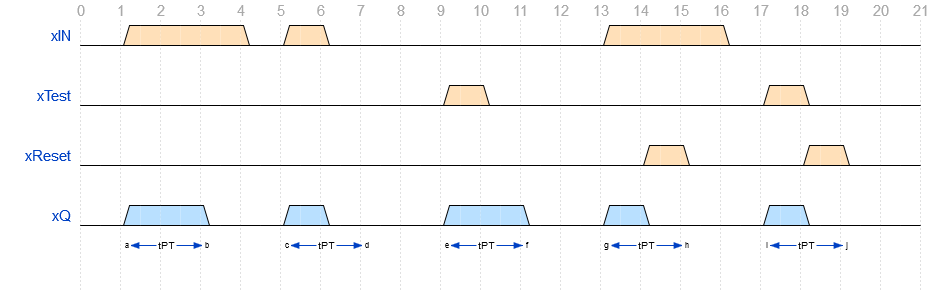
Am Impulsausgang *xQ* wird nach jeder ansteigenden Flanke (FALSE > TRUE) am binären Eingang *xIN* und / oder am Sollwert / Parameter **xTest** ein Impuls mit einer Zeitdauer *tPT* erzeugt (Voraussetzungen: *xReset* = FALSE und keine abfallende Flanke am Eingang *xIN*).\
\
Jede ansteigende Flanke (FALSE > TRUE) am Rücksetzeingang *xReset* setzt den Impulsausgang *xQ* unmittelbar zurück (= FALSE).\
Jede abfallende Flanke (TRUE > FALSE) am binären Eingang *xIN* setzt den Impulsausgang *xQ* unmittelbar zurück (= FALSE).\
\
Die Flankenerkennung (FALSE > TRUE) an den Eingängen *xIN* bzw. **xTest** hat gegenüber der Flankenerkennung an den Eingängen *xReset* (FALSE > TRUE) bzw. *xIN* (TRUE > FALSE) eine höhere Priorität.\
Dies hat zur Folge, das trotz gleichzeitiger Flankenerkennung ein Impuls mit einer Zeitdauer *tPT* am Ausgang *xQ* erzeugt wird.\
\
Der Sollwert/Parameter **xTest** wird zyklisch deaktiviert (= FALSE).
### Schnittstellen
#### Eingänge
| Name | Datentyp | Wertebereich | Initialwert | Funktion |
| -------- | -------- | ------------ | ----------- | -------------------------------------- |
| *xIN* | BOOL | | | Binärer Eingang (FALSE > TRUE ) |
| *tPT* | TIME | | T#1s | Zeitdauer des Ausgangsimpulses in s |
| *xReset* | BOOL | | | Binärer Rücksetzeingang (FALSE > TRUE) |
#### Ausgänge
| Name | Datentyp | Wertebereich | Initialwert | Funktion |
| ----- | -------- | ------------ | ----------- | -------------------------------------------- |
| *xQ* | BOOL | | | Impulsausgang (FALSE = Aus, TRUE = Ein) |
| *tET* | TIME | 0 … *tPT* | | Aktuelle Zeitdauer des Impulses an *xQ* in s |
#### Sollwerte / Parameter
| Name | Datentyp | Wertebereich | Initialwert | Funktion |
| --------- | -------- | ------------ | ----------- | ---------------------------------- |
| **xTest** | BOOL | | FALSE | Binärer Testeingang (FALSE > TRUE) |
### Funktionsbeschreibung
#### Allgemeines
Am Impulsausgang *xQ* wird nach jeder ansteigenden Flanke (FALSE > TRUE) am binären Eingang *xIN* und / oder am Sollwert / Parameter **xTest** ein Impuls mit einer Zeitdauer *tPT* erzeugt (Voraussetzungen: *xReset* = FALSE und keine abfallende Flanke am Eingang *xIN*).\
\
Jede ansteigende Flanke (FALSE > TRUE) am Rücksetzeingang *xReset* setzt den Impulsausgang *xQ* unmittelbar zurück (= FALSE).\
Jede abfallende Flanke (TRUE > FALSE) am binären Eingang *xIN* setzt den Impulsausgang *xQ* unmittelbar zurück (= FALSE).\
\
Die Flankenerkennung (FALSE > TRUE) an den Eingängen *xIN* bzw. **xTest** hat gegenüber der Flankenerkennung an den Eingängen *xReset* (FALSE > TRUE) bzw. *xIN* (TRUE > FALSE) eine höhere Priorität.\
Dies hat zur Folge, das trotz gleichzeitiger Flankenerkennung ein Impuls mit einer Zeitdauer *tPT* am Ausgang *xQ* erzeugt wird.\
\
Der Sollwert/Parameter **xTest** wird zyklisch deaktiviert (= FALSE).
 #### Zeitausgang *tET*
Bei aktivem Impulsausgang *xQ* (= TRUE) wird die aktuelle Zeitdauer des Impulses an *xQ* (0.0 - *tPT* ) angezeigt.\
Bei inaktivem Impulsausgang *xQ* (= FALSE) wird stets der Wert T#0s angezeigt.
### CODESYS
InOut:
| Scope | Name | Type | Initial |
| ----------- | -------- | ------ | ---------- |
| Input | `xIN` | `BOOL` | |
| Input | `tPT` | `TIME` | TIME#1s0ms |
| Input | `xReset` | `BOOL` | |
| Input Const | `xTest` | `BOOL` | FALSE |
| Output | `xQ` | `BOOL` | |
| Output | `tET` | `TIME` | |
#### Zeitausgang *tET*
Bei aktivem Impulsausgang *xQ* (= TRUE) wird die aktuelle Zeitdauer des Impulses an *xQ* (0.0 - *tPT* ) angezeigt.\
Bei inaktivem Impulsausgang *xQ* (= FALSE) wird stets der Wert T#0s angezeigt.
### CODESYS
InOut:
| Scope | Name | Type | Initial |
| ----------- | -------- | ------ | ---------- |
| Input | `xIN` | `BOOL` | |
| Input | `tPT` | `TIME` | TIME#1s0ms |
| Input | `xReset` | `BOOL` | |
| Input Const | `xTest` | `BOOL` | FALSE |
| Output | `xQ` | `BOOL` | |
| Output | `tET` | `TIME` | |