> For the complete documentation index, see [llms.txt](https://support.powerio.com/hub/llms.txt). Markdown versions of documentation pages are available by appending `.md` to page URLs; this page is available as [Markdown](https://support.powerio.com/hub/codesys-hvac/en/hvac-alarm-message-library/description.md).

# Description

Alarm and email library for CODESYS IEC applications. Management, filtering and notification of alarms directly from the PLC program.

{% columns %}
{% column width="25%" %}

<figure><img src="https://2592874069-files.gitbook.io/~/files/v0/b/gitbook-x-prod.appspot.com/o/spaces%2FQR4vCFzt6ixgsqlR3pdR%2Fuploads%2Fgit-blob-d9322802fb509a82c19ebfcd46387660250e7db7%2FpowerIO%20Icon%20HVACFAM.png?alt=media" alt="" width="100"><figcaption></figcaption></figure>
{% endcolumn %}

{% column width="75%" %}
The HVACFAM Alarm Message Library enables the selection of individual alarms in the visualization. Sending emails directly from the controller or via the HVAC Portal.
{% endcolumn %}
{% endcolumns %}

***

So you can get started right away, we offer you the library as a download. A license is not required for use. If you need further support, please do not hesitate to contact us.

<a href="/hub/downloads/en/codesys-hvac-downloads/hvacfam-alarm-email-library.md" class="button primary" data-icon="up-right-from-square">Download</a> <a href="https://store.codesys.com/de/hvac-building-process-automation-sl.html" class="button secondary" data-icon="seal">Purchase license</a> <a href="https://www.powerio.com/de/kontakt" class="button secondary" data-icon="question">Get support</a>

{% hint style="info" %}
**Licensing:**

Without purchasing a license (only *Download*) the library runs for **30 minutes as an unrestricted demo version**. For productive use, a Single License (SL) / single-device license is required per controller.\
For instructions on installing licenses, please visit the page [Product Licensing](/hub/codesys-hvac/en/overview/licensing.md).
{% endhint %}

### Overview

{% columns %}
{% column width="91.66666666666666%" %}

<figure><img src="https://2592874069-files.gitbook.io/~/files/v0/b/gitbook-x-prod.appspot.com/o/spaces%2FQR4vCFzt6ixgsqlR3pdR%2Fuploads%2Fgit-blob-9d6663f79eb33f21fb3e486619a5b7ad5c46b0bd%2FScreenshot%202025-11-19%20at%2011.52.28.png?alt=media" alt=""><figcaption></figcaption></figure>

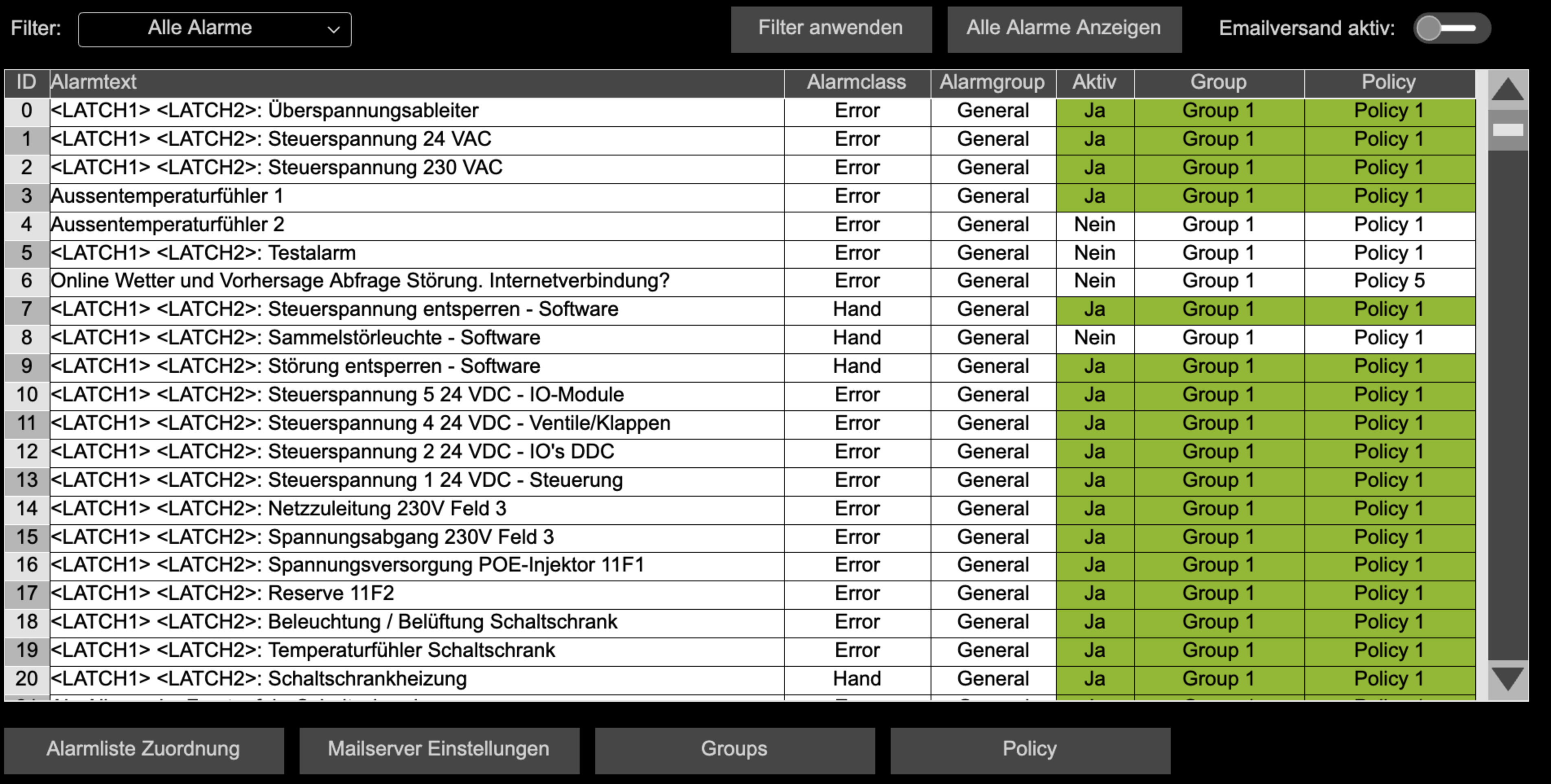
<p align="center"><em>Automatic reading of all configured alarms and setup of email sending or alarming with the HVAC Automation Portal.</em></p>
{% endcolumn %}

{% column width="8.333333333333343%" %}

{% endcolumn %}
{% endcolumns %}

***

### Description

With this library, you can read, filter, and use alarms of the CODESYS AlarmManagers via IEC code for further functions – e.g. for email notifications, custom logic, or visualizations.

The library provides an alarm buffer, traversal mechanisms, and a flexible rule set. Based on alarm classes, alarm groups, and other criteria, policies and groups can be defined that determine when and how alarm messages are processed or sent.

The main components are:

* Access to all alarms of the AlarmManagers via IEC code
* Buffering of alarms in a high-performance Alarm Buffer
* Filtering of alarms by type (e.g. alarm class, alarm group) and text
* Management of policies (rules) and groups to define alarm behavior
* Email notification for relevant alarm states
* Status and diagnostic information for email sending
* Helper blocks such as timers and FIFO buffer

***

### Details

| **Documentation Version**      | <code class="expression">space.vars.HVACFAM\_Library\_latest</code>                                                                                                                                                                        |
| ------------------------------ | ------------------------------------------------------------------------------------------------------------------------------------------------------------------------------------------------------------------------------------------ |
| **Placeholder**                | `HVACFAM`                                                                                                                                                                                                                                  |
| **Available in CODESYS Store** | *No*                                                                                                                                                                                                                                       |
| **Programming system**         | *CODESYS V3.5.17.2 or higher*                                                                                                                                                                                                              |
| **Runtime system**             | *CODESYS Control V4.2.0.0 or higher*                                                                                                                                                                                                       |
| **Licensing**                  | *Single License (single-device license)*                                                                                                                                                                                                   |
| **License**                    | <p><a href="https://store.codesys.com/de/hvac-building-process-automation-sl.html">HVAC Building Automation Package SL</a><br>+<br><a href="https://store.codesys.com/de/codesys-iiot-libraries-sl.html">CODESYS IIoT Libraries SL</a></p> |

***


---

# Agent Instructions
This documentation is published with GitBook. GitBook is the documentation platform designed so that both humans and AI agents can read, navigate, and reason over technical content effectively. Learn more at gitbook.com.

## Querying This Documentation
If you need additional information that is not directly available in this page, you can query the documentation by asking a question.

Perform an HTTP GET request on the following URL with the `ask` and `goal` query parameters:

```
GET https://support.powerio.com/hub/codesys-hvac/en/hvac-alarm-message-library/description.md?ask=<question>&goal=<user_goal>
```

`ask` is the immediate question: it should be specific, self-contained, and written in natural language.
`goal` is what the user is ultimately trying to achieve, the reason they need the answer. Sharing it helps GitBook give you a better, more relevant answer. A goal is most helpful when it describes the outcome the user wants rather than restating the question. For example, with `ask=how do I create an API token`, a goal like `automate deployments from our CI pipeline` lets GitBook tailor the answer to that use case.

The response will contain a direct answer to the question and relevant excerpts and sources from the documentation.

Use this mechanism when the answer is not explicitly present in the current page, you need clarification or additional context, or you want to retrieve related documentation sections.
